
360° video (sometimes called spherical video) is footage captured by special cameras that point lenses in all directions to create a panoramic sphere of video.
A viewer can watch 360° video in any of several ways:
Through a virtual-reality (VR) headset, a hardware device that displays video on a small face-mounted screen that updates dynamically to show different parts of a scene as the viewer turns their head. Some VR headsets can also display stereoscopic (3D) 360° video, enhancing the immersive experience.
In a rectangular window on a smart phone, tablet, or computer; the viewer can scroll the window to see different parts of the scene.
On a standard display, with the audience unable to control viewing angles. This viewing method is similar to watching conventional video, with the added benefit of giving the filmmaker more options for angle choices during editing.
360° video cameras capture overlapping fields of view using multiple lenses (or multiple cameras rigged together). Using special software, the different views are stitched together and typically stored in a rectangular frame called an equirectangular projection. Equirectangular projection squeezes the image much like the way a flat world map displays the entire surface of the round Earth.
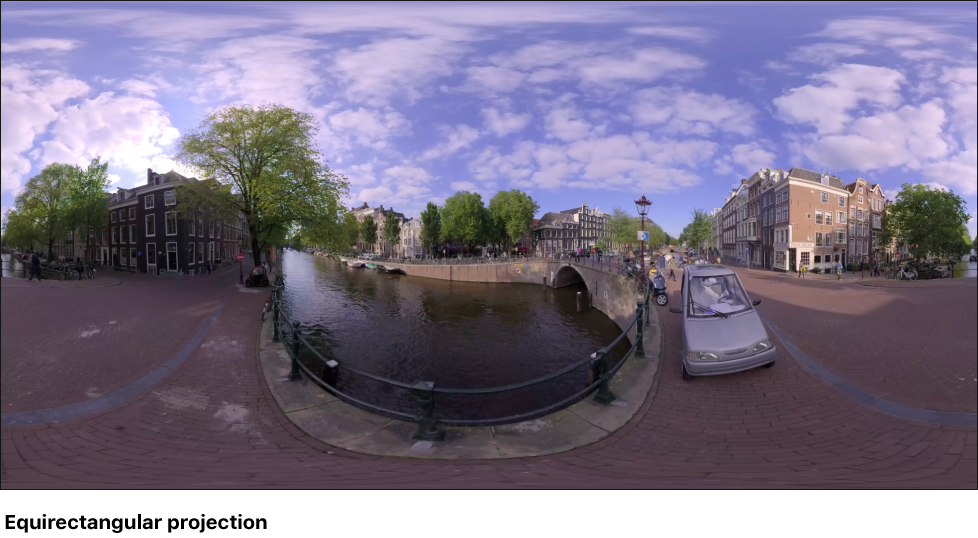
360° video can be monoscopic (2D) or stereoscopic (3D). Stereoscopic video is more challenging to capture and process because each field of view is divided into an additional left-eye image and right-eye image to create the illusion of depth.
In Motion, you can work with 360° monoscopic video in equirectangular format. In Final Cut Pro X, you can work with 360° stereoscopic video and 360° monoscopic video in equirectangular format.
Note: You can use Motion to create templates for use with 360° stereoscopic projects in Final Cut Pro. When you add a Motion template to a 360° stereoscopic project in Final Cut Pro, the template is applied to both the left-eye image and the right-eye image.
Motion offers tools that let you import, edit, and share equirectangular media to create immersive 360° viewing experiences. This chapter covers how to:
Create new 360° video-ready projects and convert existing projects
Integrate elements such as titles and particles into a 360° scene
Create templates for use in Final Cut Pro X 360° projects
Apply effects to 360° video, such as blurs or glows, without creating seams or other artifacts
Share 360° projects to a variety of video and social media websites, such as YouTube 360 and Vimeo 360