Safely store your photos and videos, documents, music, calendars, contacts, News favorites and saved stories, and more in iCloud so they’re available even if you lose your iPod touch.
Set up iCloud. Go to Settings > Sign in to your iPod touch. Create an Apple ID if you don’t have one, or use your existing one.
Content stored in iCloud is pushed wirelessly to your other devices where you’re signed in to iCloud with the same Apple ID.
iCloud is available on devices with iOS 5 or later, on Mac computers with Mac OS X 10.7.5 or later, and on PCs with iCloud for Windows 5 or later (Windows 7 or later is required). You can also sign in to iCloud.com from any Mac or PC to access your iCloud information and features like Photos, Find My iPhone, Mail, Calendar, Contacts, iWork for iCloud, and more.
Note: iCloud may not be available in all areas, and iCloud features may vary by area. For more information, go to the iCloud website.
With iCloud you can:
Access your purchases: Automatically get iTunes purchases on all your devices set up with iCloud, or download previous purchases from the iTunes Store, App Store, and iBooks Store for free, anytime.
Access your music: With an Apple Music membership, any music you added from Apple Music is accessible from iPod touch. With an iTunes Match subscription, music from your library, including music you imported from CDs or purchased somewhere other than the iTunes Store, can also be stored in iCloud and played on demand.
Store your photos and videos: Use iCloud Photo Library to store all your photos and videos in iCloud. You can access them from any device with iOS 8.1 or later, a Mac with OS X 10.10.3 or later, a PC with iCloud for Windows 5 or later, and on iCloud.com when you sign in with the same Apple ID. Use iCloud Photo Sharing to share photos and videos with only the people you choose, and let them add photos, videos, and comments.
Note: If you use iCloud Photo Library to store your photos and videos, you can’t use iTunes to sync them with your computer.
Share with your family: With Family Sharing, up to six family members can share their purchases from the iTunes Store, App Store, and iBooks Store. With an optional Apple Music family membership, all family members can use Apple Music. Pay for family purchases with the same credit card and approve kids’ spending right from a parent’s device. Plus, share photos, a family calendar, and more.
Store and retrieve your documents: Store PDFs in iCloud and access them in iBooks from your iPhone, iPad, iPod touch, Mac, or PC. With iCloud Drive you can safely store your presentations, spreadsheets, images, and other documents in iCloud, and access them from your iPhone, iPad, iPod touch, Mac, or PC. iCloud Drive is available on any device with iOS 8 or later and on any Mac with OS X 10.10 or later. If you’re using an earlier version of iOS, see Set up iCloud Drive.
Synchronize mail, contacts, calendars, and more: Keep your mail, contacts, calendars, notes, and reminders up to date across all your devices.
Note: If you use iCloud to store your contacts and calendars, you can’t use iTunes to sync them with your computer.
Keep tabs on your browsing: With Safari tabs you can see the tabs you have open on your other iOS devices and Mac computers. See Browse the web.
Keep News up to date across all your devices: Access your favorite News sources and topics as well as the saved stories on all your devices with iOS 9 or later that are set up with iCloud. (News isn’t available in all areas). See Get started with News.
Back up your data: Back up iPod touch to iCloud automatically when iPod touch is connected to power and Wi-Fi. iCloud data and backups sent over the Internet are encrypted. See Back up iPod touch with iCloud Backup.
Find your iPod touch: Use the Find My iPhone app on another iOS device—or use the Find My iPhone web app on any Mac or PC—to locate your missing iPod touch on a map, lock it remotely, suspend or remove the ability to pay using Apple Pay, play a sound, display a message, or erase all the data on it. Find My iPhone also includes Activation Lock, which requires your Apple ID and password to disable Find My iPhone, erase iPod touch, or reactivate your device. See Find My iPod touch.
Find your friends: Use Find My Friends to share your location with friends and family.
Store and access your passwords and credit card information: iCloud Keychain keeps passwords and credit card information up to date across all your designated devices.
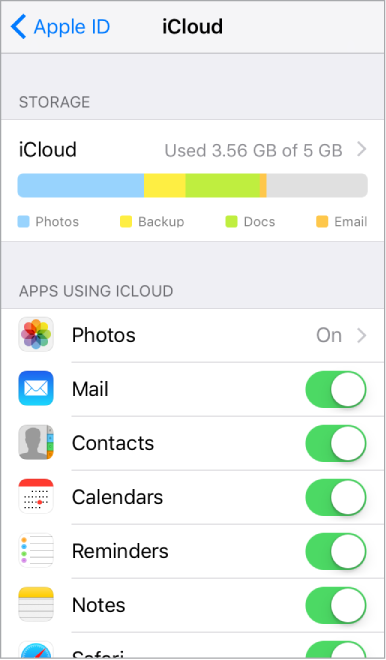
With iCloud, you get a free email account and 5 GB of storage for your mail, documents, photos and videos, and backups. Your purchased music, apps, TV shows, and books don’t count against your available storage space. You can purchase additional storage right from your device.
Upgrade your iCloud storage. Go to Settings > [your name] > iCloud > iCloud Storage > Change Storage Plan. For information about upgrading your iCloud storage, see iCloud Help.
View and download previous or shared purchases. You can download purchases from the iTunes Store, App Store, and iBooks Store.
iTunes Store purchases: Go to the iTunes Store, tap More, then tap Purchased. You can also access your purchased songs and videos in the Music app (see Library), the TV app (see Library), and the Videos app (see Add videos to your library).
App Store purchases: Go to the App Store, tap Updates, then tap Purchased.
iBooks Store purchases: Go to iBooks, then tap Purchased.
If you don’t see your previous or shared purchases, make sure you’re signed in with your Apple ID in Settings > iTunes & App Store.
Turn on Automatic Downloads for music, apps, or books. Go to Settings > iTunes & App Store.
For more information about iCloud, go to the iCloud website. For support information, go to the iCloud Support website.