
In the Devices and Simulators window, view the crash logs to help you diagnose a problem when your app crashes. You can view a crash log on a device where it occurred or view crash logs you import from other sources—for example, view logs about crashes on user devices.
If you have an archive containing the matching build and .dSYM files, Xcode automatically symbolicates crash logs. Xcode replaces the memory addresses in the crash log with human-readable function names and line numbers. Then you can view the stack trace for each execution thread in the Devices and Simulators window.
For this reason, do not delete archives that you upload, export, and distribute to users. For example, if you distribute your app to registered devices (iOS, tvOS, watchOS) or distribute your app to registered computers (macOS), retain the archive so you can import unsymbolicated crash logs you receive from users.
You can also view crashes for apps distributed using TestFlight or the App Store. If you include bitcode when you upload your app, the App Store generates the dSYM files and you must download the dSYM files before you can view crashes in the Devices and Simulators window. If you don’t include bitcode or distribute your app outside the App Store, your archive already contains the dSYM files.
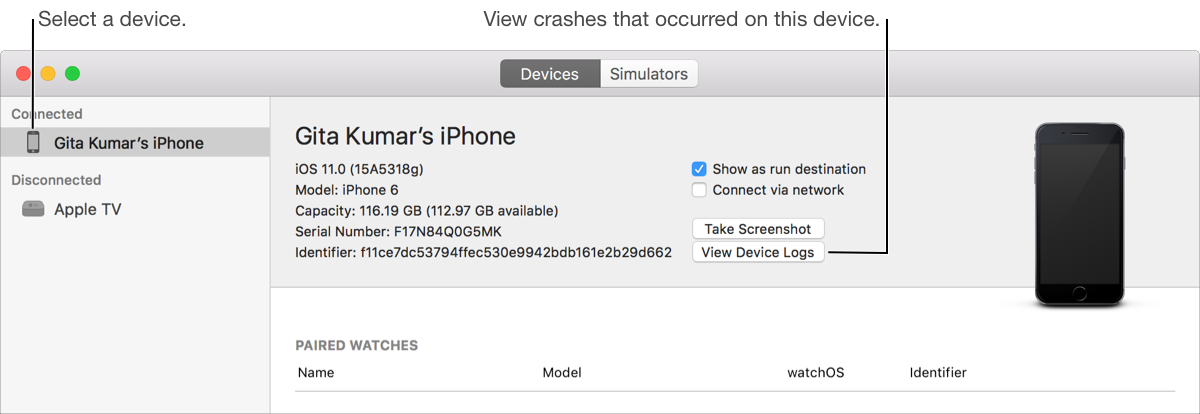
For iOS and tvOS apps, connect a device to your Mac. For watchOS apps, connect an iPhone paired with an Apple Watch.
Open the Devices and Simulators window, then click Devices.
In the left column, select the device, then select View Device Logs.
A sheet displays the crash logs.
In the left column of the sheet that appears, select the crash log you want to view.
The crash log content displays on the right.
Click Done.
Open the Devices and Simulators window, then click Devices.
In the left column, select the device, then select View Device Logs.
Drag the crash log from the Finder to the left column of the sheet that appears.
In the left column, select the crash log.
The crash log appears in the detail view on the right.
Click Done.
In the Crashes organizer, you can also view crash reports generated by Apple for apps that are distributed through the App Store or TestFlight.