
Use the Crashes organizer to view the crash reports generated for apps that you distribute using TestFlight (iOS, tvOS, watchOS) or distribute through the App Store.
Important: For apps released in the App Store, the user must agree to share crash data with developers. (TestFlight users automatically share crash logs with developers.) Only the Team Agent or Admin role, or an iTunes Connect user can view crash reports.
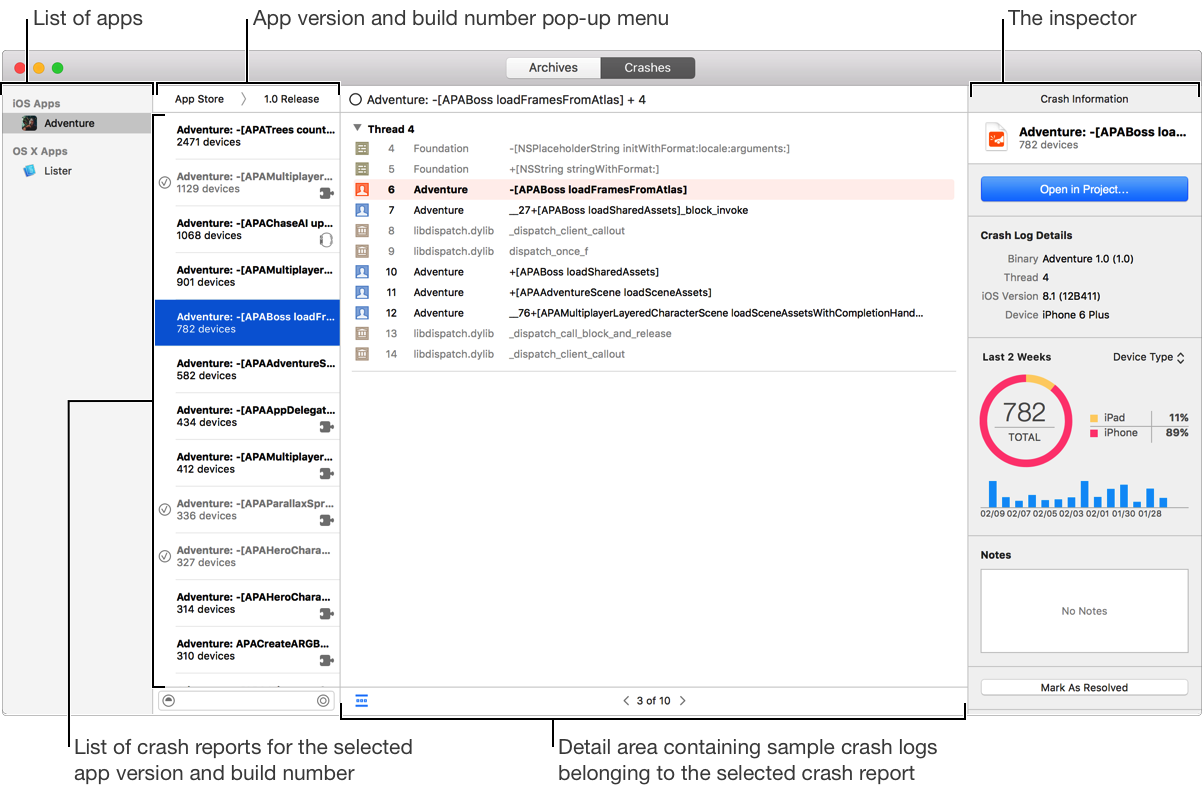
To view crash reports in the Crashes organizer, choose Window > Organizer and click Crashes. Xcode begins refreshing the crash reports for your apps, including app extensions. Xcode downloads the top crash reports—crash reports with the most number of occurrences on unique devices—that occurred during the past two weeks. However, there may be up to a three-day delay between when you first distribute your app and when crash reports are available in Xcode.
The Crashes organizer contains these components:
The list of apps shows all the apps submitted to the App Store. If you belong to multiple teams, the apps submitted by all teams appear in the list. The list includes any local archive that you haven’t submitted to the App Store yet.
The app version and build number pop-up menu contains your recent builds distributed through the App Store or TestFlight. The menu items use the same version and build numbers that appear in iTunes Connect and are in the bundle when you upload your app. In Xcode, the version number and build string appear in the target’s General pane and in the app’s Info.plist.
The list of crash reports contains the crash reports for the selected app version and build number. The number of unique devices effected appears under the crash report title. A crash report contains only a sample of crash logs. The name of a crash report defaults to the stack frame where the crash likely occurred. Crash reports for a WatchKit extension are denoted with a watch icon ( ) on the right. Crash reports for other app extensions are denoted with a puzzle icon (
 ).
).
The detail area shows the crash logs (one at a time) for the selected crash report. A crash log groups the stack frames by threads. Stack frames in your app are denoted with a person icon ( ) on the left and appear in black text. Stack frames in frameworks and system code are denoted with other unique icons and appear in gray text. The stack frame where the crash likely occurred is highlighted.
The inspector shows metadata about the crash report—such as the name, version, build, and notes—as well as other metrics. Changes you make to metadata are stored locally.
Apple provides a service that collects crash logs from users and organizes them into downloadable crash reports. The service that creates the crash reports does the following:
Collects crash logs from apps and app extensions running on user devices
Symbolicates the crash logs (replaces memory addresses with human-readable names)
Compares stack traces to identify and group similar crash logs into crash reports
Removes all personal user data from crash logs
Provides the total number of unique devices where the crash occurred
Provides a sample set of crash logs for each crash report
Updates crash reports daily
Symbolication is the process of replacing memory addresses in a crash log with human-readable function names and line numbers. Where symbolication occurs depends on the distribution options you select when you upload your app to iTunes Connect.
Distribution options | Where symbolication occurs | ||||||||||
|---|---|---|---|---|---|---|---|---|---|---|---|
Don’t include bitcode Upload symbols | The service symbolicates the crash logs. | ||||||||||
Include bitcode Upload symbols | The App Store compiles the bitcode and generates the dSYM files with full symbol names. Then the service symbolicates the crash logs. | ||||||||||
Include bitcode Don’t upload symbols | The App Store compiles the bitcode and generates the dSYM files with obfuscated symbols. When you download the dSYM files, Xcode de-obfuscates the symbols using the | ||||||||||
Don’t include bitcode Don’t upload symbols | Xcode symbolicates crash logs using the dSYM files in your archive or dSYM files it finds on your Mac that are indexed by Spotlight. If Xcode can’t find the dSYM files, the crash log will not be symbolicated. If you can provide the dSYM files later, you can try to symbolicate the crash log again. | ||||||||||