
If you implement your own user interface and model objects, you can add them to a user interface file so that they are also instantiated at runtime. Objects you add will reside in the file unlike placeholders—such as the File’s Owner, First Responder, and Application objects—which reside in your app. You can add custom objects using the Object template. Then you specify their class in the class inspector and make connections to other objects in the file.
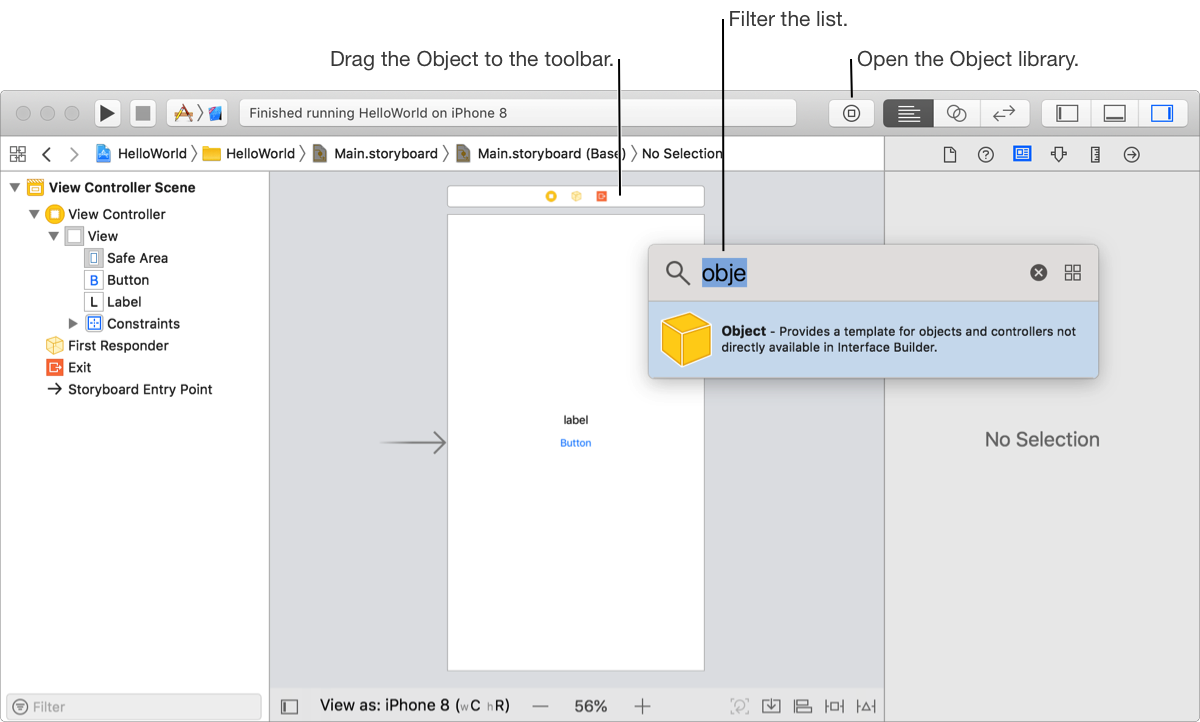
In Interface Builder, click the Object library button ( ) in the toolbar.
To quickly find the Object template, enter object in the filter bar at the top of the library.
Drag the Object template from the Object library to the toolbar above the view controller.
Alternatively, drag the Object template to the outline view. (To show the outline view, click the Show Document Outline button at the lower-left corner of the canvas.)
In the inspector area, click the Identity inspector button ( ).
).
In the Class field, enter the name of your class or choose it from the pop-up menu if the code is in your project.
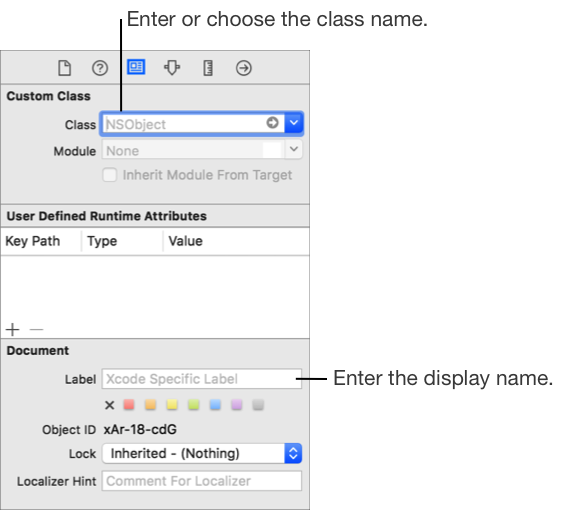
In the Label field under Document, enter a display name for your custom object.