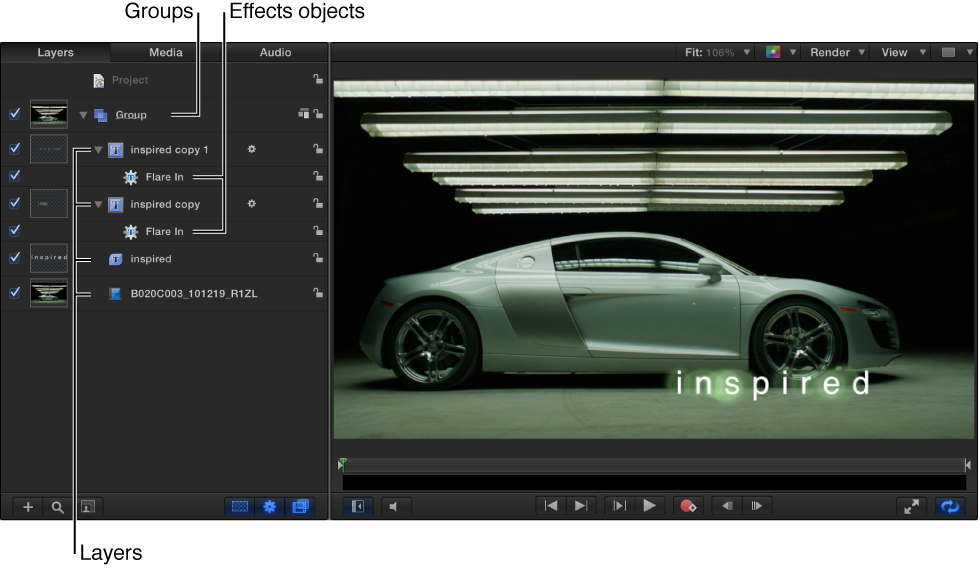

The composition you build in Motion, then save and share, is called a project. The basic components of your project—images, video clips, applied special effects, and so on—are represented in the interface as objects that you can select, drag, and manipulate in various ways. There are several categories of objects that you’ll use in every project:
Groups: The basic containers used in a project to organize imported media and Motion content and effects. A group can contain one or more objects, as well as other, nested groups.
Layers: A specific kind of object that you can see in the Canvas, including:
Images or video clips: Still pictures and movies that you import into Motion. See Add and manage content overview.
Shapes: Rectangles, circles, lines, and more complex shapes that you create in Motion using the shape tools. See Shapes, masks, and paint strokes overview.
Masks: A special type of shape used to create regions of transparency in layers. See Shapes, masks, and paint strokes overview.
Paint strokes: Freehand shapes drawn in a single, continuous movement. See Shapes, masks, and paint strokes overview.
Text: Type that you can add and animate in a project. See Basic text overview.
Particle systems: Sophisticated animation effects composed of swarming small particles. You can create your own particle systems or apply the pre-built particle systems that come with Motion. See Particles overview.
Replicators: Patterns of repeating visual elements you can create or apply to build cascading arrays of kaleidoscopic imagery. See Replicator overview.
Generators: Graphical images that come with Motion, including colors, bars, stripes, and gradients that you can add to your project. See Generators overview.
Effects objects: Special effects that you apply to visual layers. Effects objects are not visible in the Canvas on their own; rather, they modify the visual layers you see in the Canvas. Motion includes the following effects objects:
Cameras: An angle of view that you can adjust or animate to create the illusion of panning, dollying, or zooming through your composition. See Add a camera.
Lights: Simulated illumination sources that you can direct at any visible layer in the canvas. See Add lights.
Behaviors: Sophisticated animation and simulation effects that you can apply to the visual layers in your project. For example, you can use the Spin behavior to make a shape rotate over time at a rate you specify. See Behaviors overview.
Filters: Special visual effects used to modify the appearance of visual layers in Motion. For example, you can use a blur filter to make an image or shape appear to be out of focus. You can also animate filters. See Filters overview.
In Motion Help, the term object is often used to describe the superset of all elements (groups, layers, and effects objects) that comprise and act upon a composition. Layer, however, always refers to the image-based elements acted upon—the visual media you see in the Canvas.