
Adjust the space between lines
Select the text box, shape, or table cell, row, or column whose spacing you want to change. You can also select specific text.
Click the Text tab at the top of the sidebar on the right, then click the Style button near the top of the sidebar.
If you don’t see a sidebar, or the sidebar doesn’t have a Text tab, click
 in the toolbar.
Do one of the following:
To apply standard spacing, click the pop-up menu to the right of Spacing, then choose an option.
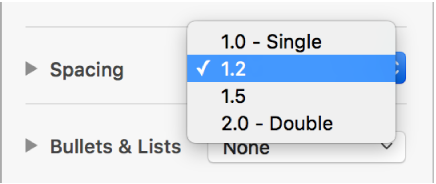
If you don’t see these options, click the disclosure triangle next to Spacing to see them (to close the disclosure triangle).
For finer control over the spacing, click the pop-up menu below Spacing, then choose an option (if you don’t see a pop-up menu below Spacing, click the disclosure triangle to expand it):
Lines: The distance between ascenders (parts of letters that extend to the top of the line) and descenders (parts of letters that extend below the line) stays the same. The space between lines is proportional to the font size.
At least: The distance between lines stays fixed (but lines don’t overlap if the text gets large). The distance from one line to the next will never be less than the value you set, but it may be larger for larger fonts to prevent overlapping text lines.
Exactly: The value sets the precise distance between text baselines, which may result in some overlap.
Between: The value you set increases the space between the lines, instead of increasing the height of the lines. By contrast, double-spacing doubles the height of each line.
Click the arrows next to the spacing field to set the amount of space for the option you chose.
To adjust the amount of space before and after the selected paragraph, click the arrows for Before Paragraph and After Paragraph.