
Bass Amp Designer emulates the sound of famous bass guitar amplifiers and the speaker cabinets used with them. Each model combines an amp and cabinet that re-create a well-known bass guitar amplifier sound. Amp models include integrated compression and EQ to customize the tone. Cabinet models let you choose a virtual microphone and position it in relation to the speakers.
Each Bass Amp Designer model includes an amp and a direct box, which mimic the technique of plugging directly into a mixing board. You can use the amp or direct box independently, or blend the two in parallel.
The Bass Amp Designer plug-in is divided into the following main areas:
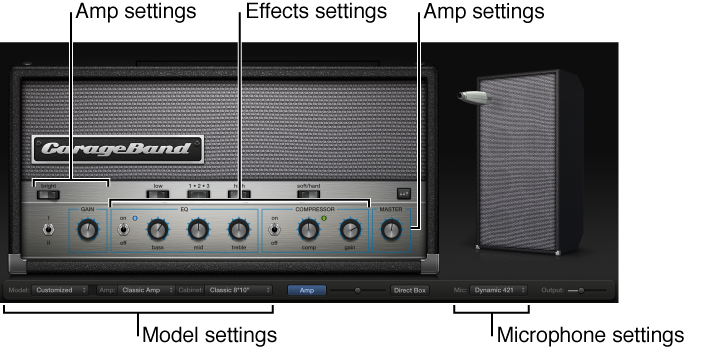
Model settings: Use the Model pop-up menu at the bottom to choose an amp model, which includes an amplifier, a cabinet, and a microphone. You can also choose an amp, cabinet, or microphone independently, set the blend between the amp and direct box, and set the final output. See Create a custom bass amp model.
Amp settings: Located at either end of the knobs section, these settings are used to set an amp’s input gain, presence, and master output level. See Use the bass amp controls.
Effects settings: Use the Effects settings in the center of the knobs section to control the integrated EQ and compressor effects. An additional EQ is shown above the compressor controls when the EQ button is turned on. See Use the bass amp effects.
Microphone settings: Located at the right of the window, these settings set the type and position of the microphone that captures the amplifier and cabinet sound. See Choose and place the microphone.
Output slider: The Output slider is located at the lower-right corner of the interface. It serves as the final level control for Bass Amp Designer’s output.
Note: The Output slider is different from the Master control, which helps shape the tone as well as controlling the level of the Amp section.
You can configure the signal flow of Bass Amp Designer in a variety of ways: pre-amp with passive or active EQ, compressor, a straight power amp, direct box alone, bass amp alone, or both in parallel. For more information, see Bass Amp Designer signal flow.
Select an audio track with an electric bass patch, then click the Smart Controls button  in the control bar.
Click the Amp Designer button  in the Smart Controls menu bar.
You can also use the Bass Amp Designer plug-in on audio and software instrument tracks. For information about using effect plug-ins, see Add and edit effect plug-ins.