
Bass Amp Designer provides multiple EQ types to sculpt your tone, and a dedicated compressor optimized for electric bass. In addition to the amp model EQ controls, Bass Amp Designer offers a Graphic or Parametric EQ.
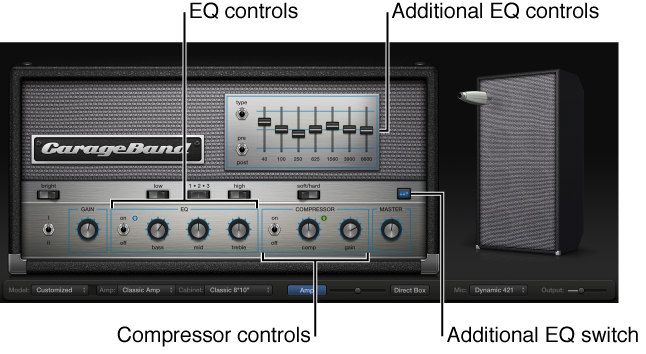
The EQ section contains a larger and more inclusive set of the EQ units found in the three original bass amps emulated by Bass Amp Designer, with the following settings:
EQ on/off switch: Click to turn the amp model EQ on or off.
Bass, Mids, and Treble knobs: Rotate to adjust the frequency ranges of the EQ, similar to the tone knobs on a hardware amplifier.
Low switch: Click to switch between two positions that affect the tone and behavior of the Bass EQ knob.
1-2-3 switch: Click to switch between three positions that affect the tone and behavior of the Mids EQ knob.
High switch: Click to switch between two positions that affect the tone and behavior of the Treble EQ knob.
The compressor features an AutoGain function to compensate for volume reduction that can be caused by compression, as well as the following settings:
Compressor on/off switch: Click to turn the Compressor on or off.
Soft/Hard switch: Click to switch between two compression algorithms:
Soft: Compression with a slow attack and longer sustain phase.
Hard: Stronger compression, with good control over levels, which makes it easier to fit the bass into an arrangement.
Comp(ression) knob: Rotate to set the amount of compression intensity applied to the input signal.
Gain knob: Rotate to add gain to, or subtract gain from, the gain staging of the internal AutoGain feature.
Note: AutoGain is always active.
Bass Amp Designer offers an additional Graphic or Parametric EQ that you show using the EQ switch at the upper-right corner of the plug-in window. The Graphic EQ includes the following settings:
Type switch: Click the up position to choose the Graphic EQ. Click the down position to choose the Parametric EQ.
Graphic and Parametric EQ settings are retained when switching between the two types, and when the additional EQ is turned off, so you can quickly make A/B comparisons.
Pre/Post switch: Click to set whether the Parametric EQ is inserted before (pre) or after (post) the compressor section in the signal flow.
Note: By default, the Graphic EQ is set to the Pre position.
Frequency sliders: Drag to set the amount of boost or cut for each frequency band.
After opening the Graphic EQ, you can switch to the Parametric EQ by clicking the Type switch. The Parametric EQ includes the following settings:
Type switch: Click the up position to choose the Graphic EQ. Click the down position to choose the Parametric EQ.
Graphic and Parametric EQ settings are retained when switching between the two types, and when the additional EQ is turned off, so you can quickly make A/B comparisons.
Pre/Post switch: Click to set whether the Parametric EQ is inserted before (pre) or after (post) the compressor section in the signal flow.
Gain knobs: Rotate to adjust the amount of cut or boost applied to the frequency range set with the kHz knobs.
kHz knobs: Rotate to set the frequency range that you want to cut or boost with the Gain knob.
Q knobs: Rotate to set the width of the band surrounding the frequency set with the kHz knobs.
The lower the Q value, the wider the band, which means that more frequencies will be affected. The higher the Q value, the narrower the band, which means that only the frequencies nearest to the frequency set with the kHz knob will be affected.