
Use the static analyzer to find flaws—potential bugs—in your code before running it.
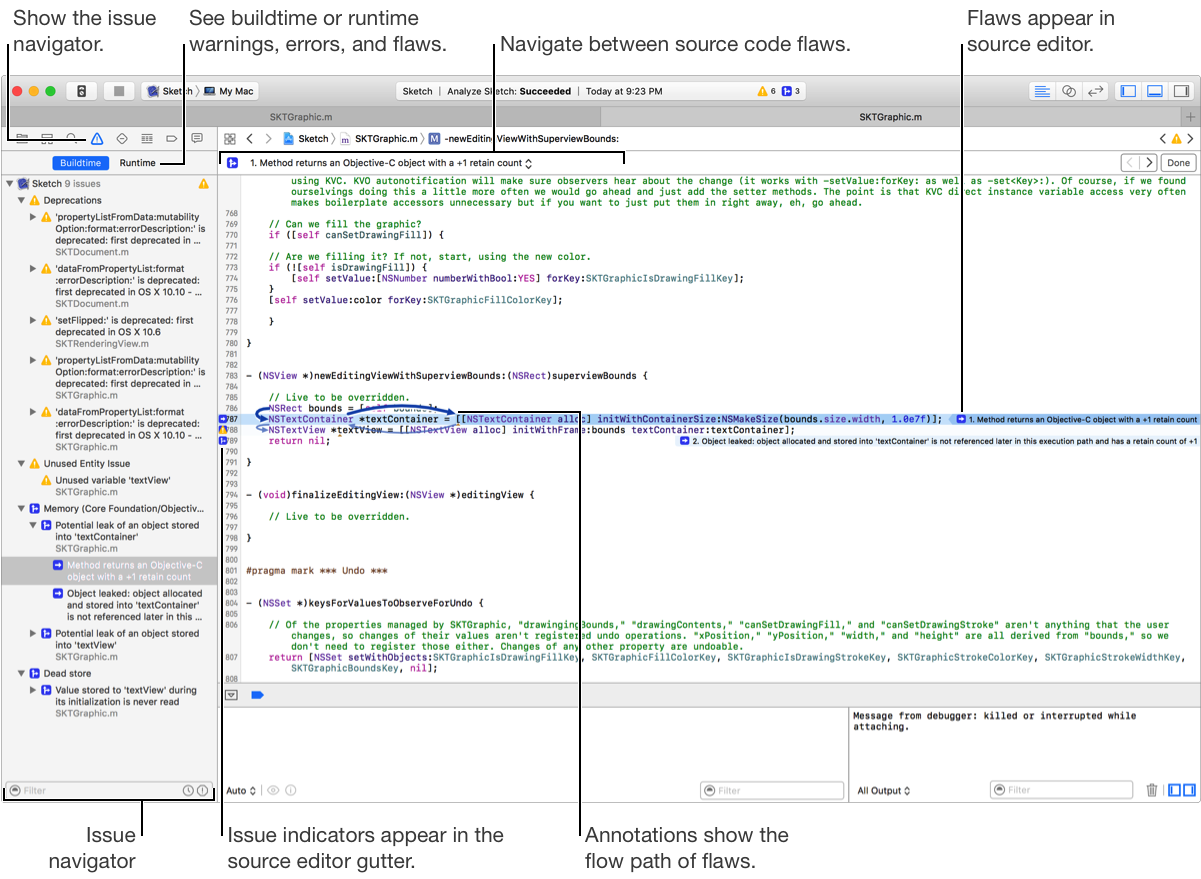
Choose Product > Analyze.
Open the Issue navigator.
When performing analysis, in addition to errors ( ) and warnings (
 ), the Issue navigator shows you potential flaws (
 ) in your code.
Click Buildtime.
Select a flaw in the Issue navigator or choose a flaw from the pop-up menu above the source editor to locate the offending code. Note that the pop-up menu is only visible if flaws are detected.
Study the flow path of the flaw in the source editor.
Edit your code to fix the flaw.
If the static analyzer doesn’t report any problems, don’t assume there are none. The tool doesn’t detect all code flaws. Run your app to test it in the debugger too.
Tip: You can suppress false positive messages from the analyzer using assertions and attributes. For more information, see FAQ and How to Deal with Common False Positives on the Clang Static Analyzer website.