
The source editor scans as you type and marks any issues it detects. You can then apply a suggested correction in a Fix-it dialog to repair your code.
Important: To use Fix-it, you must build the target with the LLVM or Swift compiler, the indexing of your project must be complete, and “Show live issues” must be selected in general preferences. Fix-it works with Swift, C, Objective-C, and Objective-C++.
Enter code in a source file.
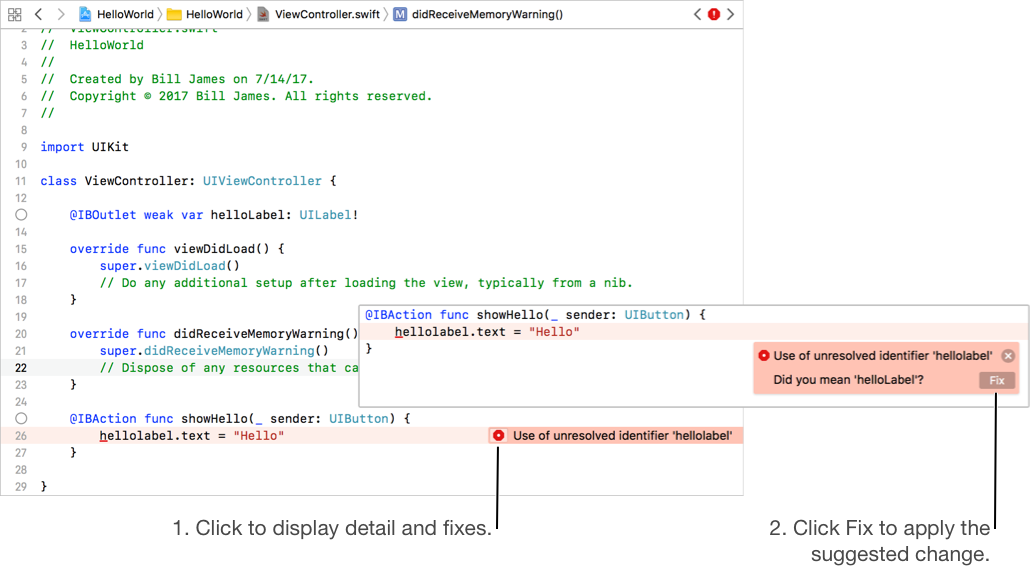
The source editor marks issues with a red underline at the position of the issue, and displays a summary of the issue to the right.
When the issue summary appears, click the icon on the left of the summary text.
A Fix-it popover appears that describes the problem and suggests corrections.
To select a correction, click the Fix button. To cancel, press the Esc (Escape) key.
To go to the next Fix-it issue, choose Navigate > Jump to Next Issue.
To go to the previous Fix-it issue, choose Navigate > Jump to Previous Issue.