
Use the project editor to view and edit your project and target settings. To display the project editor, click the Project Navigator button ( ) in the navigator bar and select a project in the content area below. The project editor appears to the right of the navigator. Select a project or target in the project editor to edit its settings.
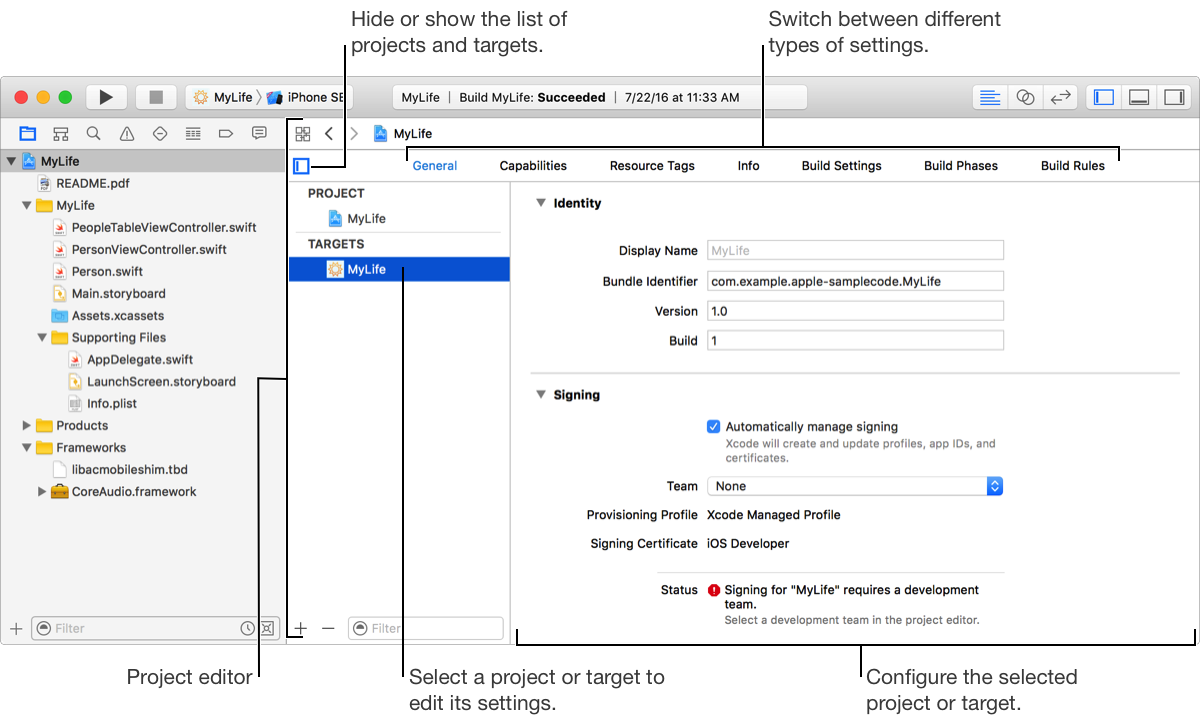
The project editor includes the following settings panes, which vary depending on whether a project or target is selected:
General: Adjust the most commonly modified target settings, such as identity, signing, and deployment options.
Capabilities: Add special capabilities to a target to enable services provided by Apple, such as Push Notifications, CloudKit, Game Center, and In-App Purchase.
Resource Tags: Identify and manage sets of on-demand resources.
Info: Edit the properties of a project or target, including Info.plist values, supported document types, and localizations.
Build Settings: Customize options that affect the behavior of the build system while building your project.
Build Phases: Edit and reorder tasks performed by the build system while building your project, such as running a script, copying files, or linking to frameworks.
Build Rules: Customize rules the build system uses when processing certain types of files during the build process.