
Use the navigator area in the main window for quick access to the different parts of your project.
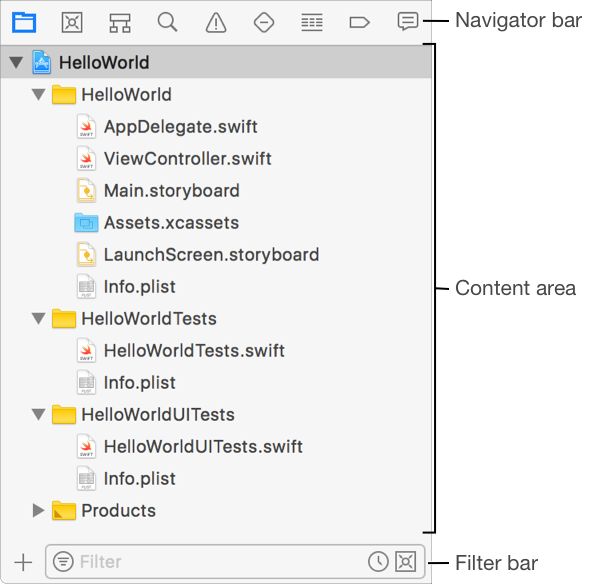
Clicking a button in the navigator bar shows different parts of your project in the content area. The different navigators are:
Icon | Navigator | Description | |||||||||
|---|---|---|---|---|---|---|---|---|---|---|---|
| Project navigator | Add, delete, and group files, and open files in the editor. | |||||||||
| Source Control navigator | View your source control working copies, branches, commits, tags, and remote repositories. | |||||||||
| Symbol navigator | Browse the symbols in your project or a specified scope. | |||||||||
| Find navigator | Find any string in your project and frameworks. | |||||||||
| Issue navigator | Display issues found when opening, analyzing, and building your project. | |||||||||
| Test navigator | Create, manage, and run unit tests, and also review their status. | |||||||||
| Debug navigator | Examine running threads and stack information. | |||||||||
| Breakpoint navigator | Add, delete, and edit breakpoints. | |||||||||
| Report navigator | View the history of building, running, and debugging your project, and of source control tasks. | |||||||||
Type text into the filter bar to show only only the information you need.


