
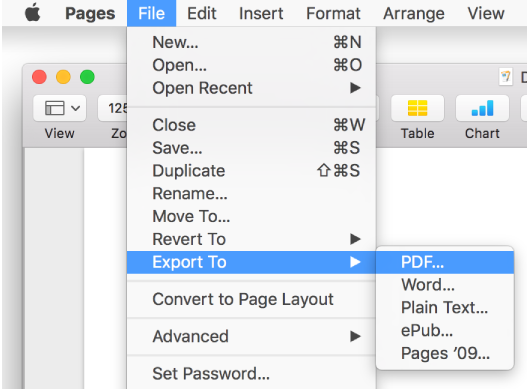
You can export a Pages document to save a copy of it in another format—Microsoft Word, PDF, plain text (TXT), ePub, or Pages ‘09. Exporting a document is useful when you’re sharing it with others who may use different software from you. Any changes made to the exported document don’t affect the original.
Note: You can’t export page layout documents in ePub format.
Open the document, then choose File > Export To > [file format] (from the File menu at the top of your screen).
Specify export settings, which differ depending on the file type:
PDF: Choose an image quality. The higher the image quality, the larger the file size of the exported copy. To restrict access to the copy, select the “Require password to open” checkbox, then enter the requested information.
Word: To restrict access to the copy, select the “Require password to open” checkbox, then enter the requested information. If the file needs to be compatible with an older version of Word (1997-2004), click Advanced Options, then choose .doc from the pop-up menu.
ePub: Enter the title and author name. If you want to assign it to a category, click the Primary Category pop-up menu, then choose a category. To set the language and book cover and to set whether fonts are embedded, click the disclosure triangle next to Advanced Options.
Pages ‘09: To restrict access to the copy, select the “Require password to open” checkbox, then enter the requested information.
Click Next, then type a name for the document.
The filename extension (.pdf or .epub, for example) is automatically appended to the document name.
Enter one or more tags (optional).
To choose where to save the document, click the Where pop-up menu, choose a location, then click Export.
To see more locations, click the arrow button next to Save As.
Note: If you set a password, it protects only your exported copy, not the original file. To set a password for the original document, see Password-protect a document. If the original file already has a password, it applies to the exported file as well.
If you’re sending the document to someone else, you can also select a different format when you send it. See Send a copy of a document for more information.