Pages can generate an automatically updating table of contents (TOC) for your document. Table of contents entries are links, so clicking one takes a reader directly to the page.
Some Pages templates already include a table of contents, which you can edit. You can also add a table of contents, then edit it to specify which parts of the document you want it to include.
To automatically generate a table of contents, you need to first apply paragraph styles to the headings you want to appear in the table of contents.
Generate a table of contents
Place the pointer where you want the table of contents to appear.
Choose Insert > Table of Contents (from the Insert menu at the top of your screen, not the Insert button in the toolbar).
Choose an option:
Document: Gathers entries from the entire document.
Section: Gathers entries from only the section where you’re inserting the table of contents.
To Next Occurrence: Gathers entries between this table of contents and the next table of contents if, for example, your document includes a TOC for each section.
If the table of contents isn’t selected, click anywhere in the table of contents to select it.
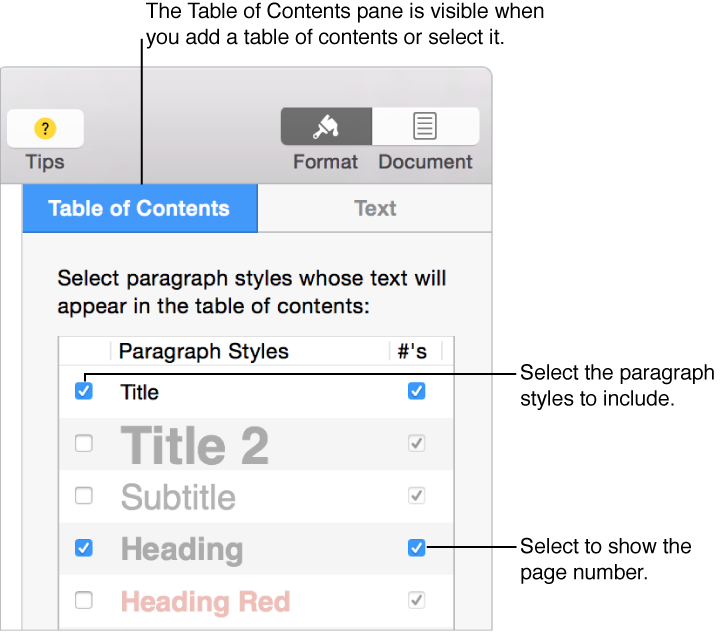
In the Table of Contents tab of the sidebar, select the paragraph styles you want to include.
If you don’t see a sidebar, or it doesn’t have a Table of Contents tab, click in the toolbar.
Change the font for a table of contents
Double-click the table of contents to select its text.
Click the Text tab at the top of the sidebar on the right.
If you don’t see a sidebar, or it doesn’t show the Table of Contents and Text tabs at the top, click in the toolbar.
Use the text controls to make the changes you want.
Delete a table of contents
Click the table of contents to show its boundary box.
Click just below the boundary box, then drag up until a thick, blue outline appears around the table of contents.

 in the toolbar.