
The Framing behavior animates the camera along a path to position it in front of a selected layer. You can control how the layer fits into the frame at the ending position, and you can control the shape of the path to affect the amount of bend or curvature, as well as the apex of such a curved path. Other parameters allow you to customize the camera’s orientation along the path, the speed at which it travels, and at what point it begins orienting towards the target object.
The Framing behavior has handles to allow you to manipulate the path and ending position in the canvas. For more information on using the Framing behavior’s handles, see Use Framing behavior onscreen controls.
Tip: Multiple framing behaviors can be arranged consecutively to move a camera from one object to another over the course of a scene.
WARNING: Applying a Framing behavior before or after a Basic Motion behavior, such as Motion Path or Throw, can create unexpected results. These behaviors can continue to affect the object even after the behavior ends. For example, if a Framing behavior is applied after a Motion Path behavior is applied, the residual effect of the Motion Path is combined with the path generated by the Framing behavior, resulting in the target object being framed improperly.
After you apply this behavior, the Framing section of the Behaviors Inspector contains the following parameter controls:
Target: An image well to specify the object upon which the camera is framed. Drag an object from the Layers list into the well.
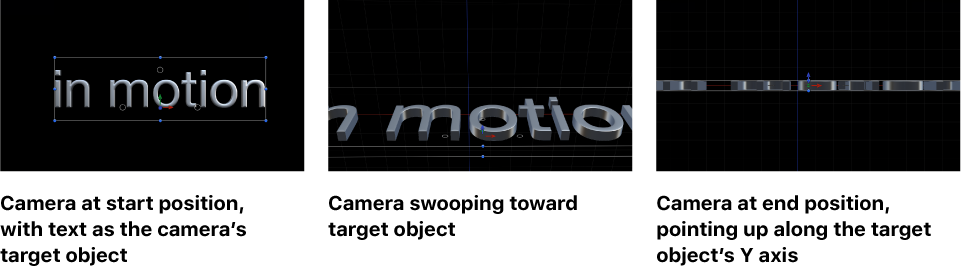
Target Face: A pop-up menu to specify which side (face) of the target layer the camera points to at the end of the framing behavior. For example, when you choose “Bottom (-y),” the camera swoops in from its original position to frame the bottom of the object, pointing up along the Y axis.
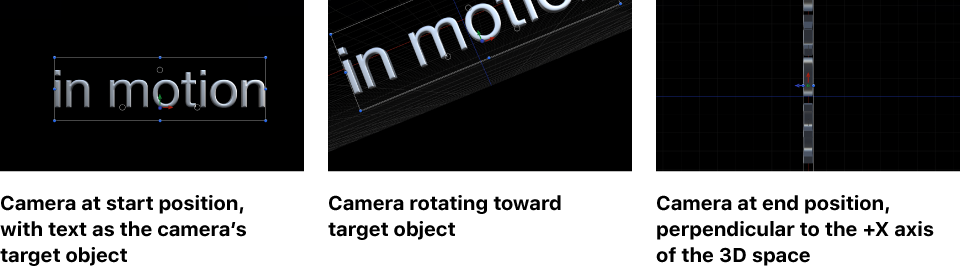
Up Vector: A pop-up menu that provides a constraint for the camera to keep it the right way up. By default, the camera is upright along the Y axis. When you choose “Target +X,” the camera moves from its original position and rotates so that it’s perpendicular to the X axis of the target object, making its upright axis +X (the right side of the X axis, based on the 0, 0, 0 coordinate system). When you choose “World +X,” the camera moves from its original position and rotates so that it is perpendicular to the +X axis of the 3D space (rather than the axis of the target layer). When you choose “Auto,” Motion tries to guess the upright axis.
For more information on coordinates, see 3D compositing overview.
Framing: A pop-up menu to specify how the target should be framed. The menu choices include the following:
Fit Horizontally: Positions the camera so the full width of the target fits in the width of the frame.
Fit Vertically: Positions the camera so the full height of the target fits in the height of the frame.
Fit Both: Positions the camera so both width and height of the target fit in the frame.
Simple Fit: Positions the camera so both width and height of the project fit in the frame. If the target object is larger or smaller than the project dimensions, it may not properly fill the frame.
Custom Fit: This option appears when you modify the Framing Offset parameter (described below).
Framing Offset: Three value sliders (X, Y, and, when expanded, Z) to offset (in pixels) the point on the target that is centered, relative to the camera. By adjusting Framing Offset, you can target a point other than the center of the object. The Z slider moves the camera nearer to or farther from the target.
Offset Path Apex: A slider to set the position along the path (from the original position to the framing position) where the bend (if any) occurs if the user chooses to offset the path. Offset Path Apex is expressed as a value between 0 and 1 (0 being at the start of the path, 1 being the end, and 0.5 being halfway along the path).
Path Offset: Three value sliders (X, Y, and, when expanded, Z) to offset the camera’s position from the path, measured in pixels.
Orientation: A pop-up menu to set whether the camera is oriented towards the target at every frame (Orient to Current) or oriented towards the target at its final position (Orient to Final).
Position Transition Time: A slider to set how long it takes the camera to reach the framing position, measured as a percentage of the behavior’s duration.
Rotation Transition Time: A slider to set how long it takes the camera to reach the framing orientation, measured as a percentage of the behavior’s duration.
Transition: A pop-up menu to set the speed of the transition. Choices include Constant, Ease In, Ease Out, Ease Both, Accelerate, or Decelerate.
Ease Out Time: A slider to set the percentage of the behavior’s duration when the ease-out effect starts. The ease out ramps down the behavior’s effect until the end of the behavior.
Ease Out Curve: A slider that sets the rate of the ease-out effect.
The HUD contains a subset of the controls in the Inspector.