Finish: A pop-up menu to set a finish type: Polish, Enamel, Brushed, Textured, or Custom Specular.
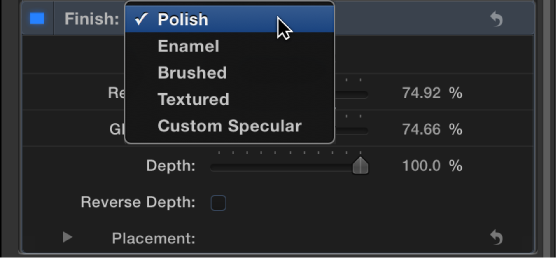

Use the Finish controls in the Appearance pane of the Text Inspector to create the effect of a reflective finish (such as polish, enamel, and so on) on the surface of the 3D text object. Depending on the option you choose in the Finish pop-up menu (at the top of the Finish section of the Appearance pane), different parameter controls become available.
Finish: A pop-up menu to set a finish type: Polish, Enamel, Brushed, Textured, or Custom Specular.
When Finish is set to Polish
Reflectivity: A slider to adjust the brightness of reflections that appear on the surface of the object. Similarly to light intensity, Reflectivity can be set above 100% to create a high dynamic range (HDR)-type effect.
Glossiness: A slider to adjust how dull or sharp reflections are. A setting of 0 creates a blurry reflection; a setting of 100 creates a sharp, mirror-like reflection.
When Finish is set to Enamel
Reflectivity: A slider to adjust the brightness of reflections that appear in the surface of the object. Similarly to light intensity, Reflectivity can be set above 100% to create a high dynamic range (HDR)-type effect.
Glossiness: A slider to adjust how dull or sharp reflections are. A setting of 0 creates a blurry reflection; a setting of 100 creates a sharp, mirror-like reflection.
Highlight Color: A color control to set a color to tint the highlights that appear in reflections on the text object’s surface.
Note: The enamel setting effectively negates any bumpiness on layers beneath it (just like the effect of adding enamel to a rough surface in the real world). For example if you place this layer over a wood layer, the grain depth of the wood will be ignored no matter high you set that parameter.
When Finish is set to Brushed
Reflectivity: A slider to adjust the brightness of reflections that appear in the surface of the object. Similarly to light intensity, Reflectivity can be set above 100% to create a high dynamic range (HDR)-type effect.
Glossiness: A slider to adjust how dull or sharp reflections are. A setting of 0 creates a blurry reflection; a setting of 100 creates a sharp, mirror-like reflection.
Depth: A slider to adjust the apparent depth of the brush pattern.
Reverse Depth: A checkbox that, when selected, inverts the brush pattern, making dark areas appear raised and light areas appear sunken into the surface.
Placement: A group of controls (available when you click the disclosure triangle) to set how the brush pattern is applied to the text object. For details, see Placement controls.
When Finish is set to Textured
Type: A pop-up menu to choose a texture: Combed, Cracked, Eggshell, and so on.
Reflectivity: A slider to adjust the brightness of reflections that appear in the surface of the object. Similarly to light intensity, Reflectivity can be set above 100% to create a high dynamic range (HDR)-type effect.
Glossiness: A slider to adjust how dull or sharp reflections are. A setting of 0 creates a blurry reflection; a setting of 100 creates a sharp, mirror-like reflection.
Depth: A slider to adjust the apparent depth of the texture pattern.
Reverse Depth: A checkbox that, when selected, inverts the texture pattern, making dark areas appear raised and light areas appear sunken into the surface.
Placement: A group of controls (available when you click the disclosure triangle) to set how the texture is applied to the text object. For details, see Placement controls.
When Finish is set to Custom Specular
Intensity: A slider to adjust the amount of light reflected in the text object’s surface.
You can control the intensity of lights and environmental light separately by clicking the disclosure triangle and exposing the following two sliders:
Lights: A slider to adjust the amount of light reflected in the object’s surface, based on the kind of light chosen in the Lighting Style pop-up menu (in the Lighting group of controls).
Environment: A slider to adjust the amount of light reflected in the object’s surface, based on the type of environment chosen in the Environment Type pop-up menu (in the Lighting group of controls).
For more information about these lighting options, see Lighting overview.
Intensity Image: A checkbox that, when selected, activates a set of controls for adding a custom image as an “intensity map.” An intensity map makes brighter areas of the image reflect more light, and darker areas limit the reflection. Use an intensity map to create the effect of a pattern or smudge on the object’s surface that dynamically modifies or limits the reflectiveness of the object. Click the disclosure triangle to reveal the following controls:
Image: An image well to assign an image used as the intensity map. Drag an image from the Layers list or Media list into this well.
White Level: A slider that sets the brightness point above which areas of the intensity map allow reflections to pass and be visible. Lowering the White Level makes the intensity map more transparent, reducing reflectivity.
Black Level: A slider that sets the brightness point below which areas of the intensity map prevent reflections from passing. Raising the Black Level means more of the image will appear opaque.
Wrap Mode: A pop-up menu that sets what happens if the image is smaller than the text object. Choose one of the following options:
None: The image is applied once, and areas of the text object that exceed the scope of the image are not covered.
Repeat: The image is applied and reapplied as often as necessary, creating a pattern to fill the area beyond the scope of the original image.
Mirror: The image is applied to the text object, then applied again in an inverted, reversed orientation to cover the area beyond the scope of the original image.
Placement: A group of controls (available when you click the disclosure triangle) to set how the intensity map is applied to the text object. For details, see Placement controls.
Shininess: A slider to adjust how mirror-like the object appears. Control this effect more precisely by clicking the disclosure triangle and adjusting two additional sliders:
Lights: A slider to adjust how sharply lights are reflected in the surface of the object. A higher setting makes reflections more sharply defined, and a lower setting creates a blurrier reflection.
Environment: A slider to adjust how sharply the environment image is reflected in the surface of the object. A higher setting makes the environment more clearly visible, and a lower setting creates a blurrier reflection.
For more about lighting options, see Adjust 3D text lighting.
Shininess Image: A checkbox that, when selected, activates a set of controls for adding a custom image as an “shininess map.” A shininess map controls the sharpness (or mirror-likeness) of the object. Click the disclosure triangle to reveal the following controls:
Image: An image well to assign an image used as the shininess map. Drag an image from the Layers list or Media list into this well. Areas of the image that are white allow the reflection to appear sharp and mirror-like. Areas that are black make the reflection appear dull and blurry.
White Level: A slider that sets the brightness point above which areas of the shininess map enable a clear, mirror-like reflection in the surface. Lowering the White Level means more of the reflection will appear clear and mirror-like.
Black Level: A slider that sets the brightness point below which areas of the Shininess Image create a dulling or blurring effect on the object’s reflections. Raising the Black Level means more of the reflection will appear blurry.
Wrap Mode: A pop-up menu that sets what happens if the image is smaller than the text object. Choose one of the following options:
None: The image is applied once, and areas of the text object that exceed the scope of the image are not covered.
Repeat: The image is applied and reapplied as often as necessary, creating a pattern to fill the area beyond the scope of the original image.
Mirror: The image is applied to the text object, then applied again in an inverted, reversed orientation to cover the area beyond the scope of the original image.
Placement: A group of controls (available when you click the disclosure triangle) to set how the shininess map is applied to the text object. For details, see Placement controls.
Specular Color: A pop-up menu to choose whether the specular color is based on the current surface, a solid color, or an image. Use this control to add a hue (or pattern) that colors the reflection as if the material were made of that color or pattern. For example, adding an orange specular color causes reflections to have an orange hue, as if the 3D text object were made of copper.
Surface Blend: A slider (available when Specular Color is set to From Surface) to adjust the amount of the underlying color blended into the highlights.
Color: A color control (available when Specular Color is set to Solid Color) to set the Specular color.
Anisotropic: A checkbox that, when selected, activates a set of controls that limit the custom specular effect to a particular pattern or direction (as opposed to the default method, which disperses the specular effect in many directions at once). This allows you to distort the highlights created by lighting styles and scene lights. Click the disclosure triangle to reveal the following controls:
Geometry: A pop-up menu to choose whether the anisotropic effect is linear, cylindrical, or based on a custom image.
Placement: A group of controls (available when you click the disclosure triangle) to set how the anisotropic specular effect is applied to the text object. For details, see Placement controls.
Place On: A pop-up menu to choose whether the anisotropic effect is applied per glyph or per object. For details, see Placement controls.
Orientation: Three dials (X, Y, and Z), available when Geometry is set to Linear, to set the direction of the linear anisotropic specular effect.
Placement: A group of controls (available when you click the disclosure triangle) to set how the anisotropic specular effect is applied to the text object. For details, see Placement controls.
Position: Value sliders (available when Geometry is set to Cylindrical) to set the position where the cylindrical anisotropic specular effect is centered.
Anisotropic Angle Image: An image well (available when Geometry is set to Image). Drag an image from the Layers list or Media list into this well to use as a map that determines the appearance of the anisotropic specular effect.
Wrap Mode: A pop-up menu (available when Geometry is set to Image) to choose how the intensity map is applied to the 3D text object if the image is smaller or larger than the 3D text object. Choose any of the following options:
None: The image is applied once, and areas of the text object that exceed the scope of the image are not covered.
Repeat: The image is applied and reapplied as often as necessary, creating a pattern to fill the area beyond the scope of the original image.
Mirror: The image is applied to the text object, then applied again in an inverted, reversed orientation to cover the area beyond the scope of the original image.
Highlight Sharpness: A slider to adjust the shape of the reflected highlight, making it narrow or wide.