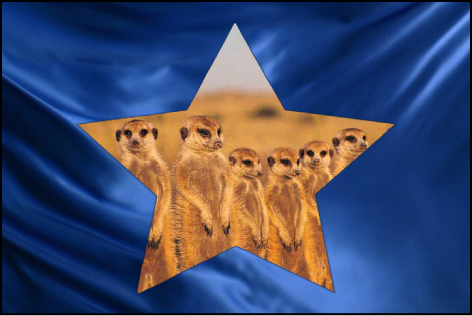

The Stencil and Silhouette blend modes let you use a single layer’s alpha channel or luma values to isolate regions of background layers and groups. (Similar effects can be accomplished using shape and image masks. In addition, masks might provide you with a greater degree of control, depending on your needs. For more information, see Shapes, masks, and paint strokes overview.)
Stencil modes crop out all non-overlapping parts of layers underneath the layer used as the stencil. Silhouette modes do the opposite, punching holes in overlapping layers underneath in the shape of the layer used as the silhouette.
When working in a 3D group, changes in depth order affect the Stencil and Silhouette blend modes differently. For example, if you have two layers in a 3D group and the upper layer is set to Stencil Alpha or Stencil Luma, the blend mode remains in effect when the upper layer is moved behind the lower layer in Z space. If you have two layers in a 3D group and the upper layer is set to Silhouette Alpha or Silhouette Luma, the blend mode does not remain in effect when the upper layer is moved behind the lower layer in Z space.
When you use the Stencil or Silhouette blend modes in a group set to the Pass Through blend mode, the resulting effect carries down through every layer in every group that lies underneath it in the Layers list, unless the group that contains it is rasterized. This is a powerful, but not always desired effect, because it prevents you from placing a background group to fill the transparent area. You can limit the Stencil or Silhouette blend mode to affect only those layers in the same enclosing group by setting the group’s blend mode to anything other than Pass Through. For example, if you set the enclosing group of the two layers in the Silhouette Alpha example to Normal, then add a group underneath containing additional layers, those layers show through the transparent areas created by the silhouetted group.
The following blend modes modify the alpha channel of the layer to which the blend mode is applied:
Stencil Alpha: Uses the alpha channel of the affected layer to crop out all non-overlapping parts of layers and groups underneath it in the Layers list.
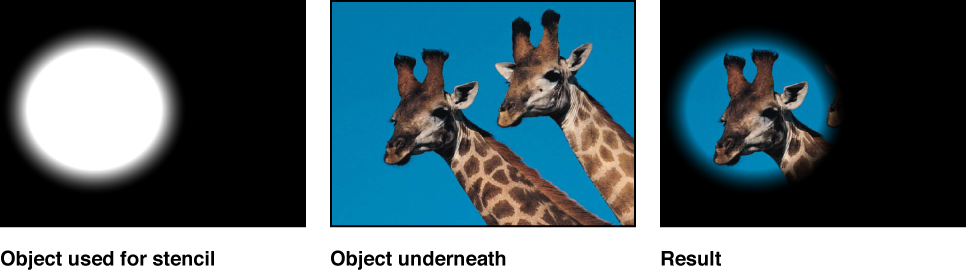
Stencil Luma: Does the same thing as the Stencil Alpha blend mode, but uses the affected layer’s luma value to define transparency. Stencil Luma is useful if the layer you want to use for cropping has no alpha channel of its own.
Silhouette Alpha: The reverse of the Stencil Alpha blend mode, useful for cutting holes in underlying layers.
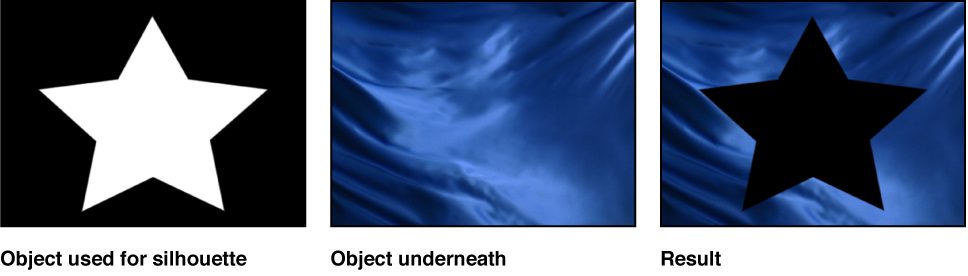
Silhouette Luma: The reverse of Stencil Luma.
Behind: Forces the layer to appear behind all other layers and groups, regardless of its position in the Layers list and Timeline. If multiple layers or groups are set to Behind, they appear behind all other groups not set to Behind, in the order in which they appear in the Layers list.
Alpha Add: Works similarly to the Add blend mode, but instead of adding the color channels of overlapping layers, it adds their alpha channels together. Try using this blend mode instead of Motion’s default method of alpha channel compositing for a different treatment of overlapping areas of translucency.
Light Wrap: Takes bright areas from the background layer at the edge of the matte and blurs them into the foreground layer. This is intended to create a more organic, seamless composite, where light from the background appears to bleed onto the foreground layer as would occur in a natural, noncomposited image. To adjust the parameters that affect the Light Wrap, such as Amount, Intensity, Opacity, and Mode, apply the Keyer filter and make those adjustments in the Filters Inspector. For more information, see Keyer filter controls.
Note: Motion applies the Light Wrap effect at the end of the rendering process. When you add other filters to the layer, such as color correction effects, they are rendered before the Light Wrap.