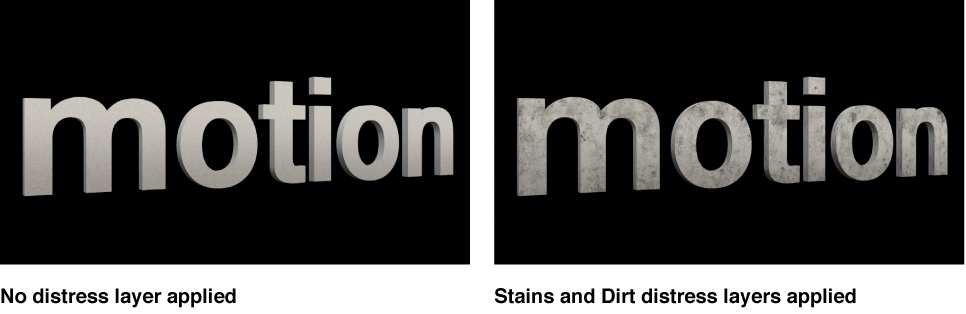

Use the Distress controls in the Appearance pane of the Text Inspector to create the effect of adding wear or degradation to the surface of the 3D text object. Depending on the option you choose in the Distress pop-up menu (at the top of the Distress section of the Appearance pane), different parameter controls become available.
Distress: A pop-up menu to set a distress type: Scratches, Stains, Dirt, Dents, Wavy, Bumps, Perforated, Wrinkles, or Custom Bumps.
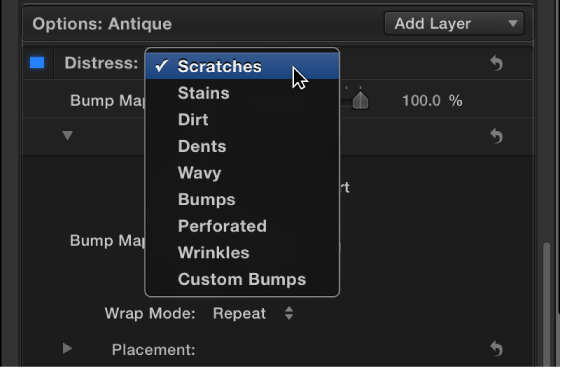
When Distress is set to Scratches
Type: A pop-up menu to choose a scratch pattern.
Depth: A slider to adjust the apparent depth of the scratches.
Placement: A group of controls (available when you click the disclosure triangle) to set how the scratch pattern is applied to the text object. For details, see Placement controls.
When Distress is set to Stains
Type: A pop-up menu to choose a stain pattern.
Opacity: A slider to adjust the visibility of the stain pattern.
Placement: A group of controls (available when you click the disclosure triangle) to set how the stain pattern is applied to the text object. For details, see Placement controls.
When Distress is set to Dirt
Type: A pop-up menu to choose a dirt pattern.
Opacity: A slider to adjust the visibility of the dirt pattern.
Placement: A group of controls (available when you click the disclosure triangle) to set how the dirt pattern is applied to the text object. For details, see Placement controls.
When Distress is set to Dents
Type: A pop-up menu to choose a dents pattern.
Depth: A slider to adjust the apparent depth of the dents in the 3D text object.
Placement: A group of controls (available when you click the disclosure triangle) to set how the dent pattern is applied to the text object. For details, see Placement controls.
When Distress is set to Wavy
Depth: A slider to adjust the apparent depth of the wave pattern.
Placement: A group of controls (available when you click the disclosure triangle) to set how the wave pattern is applied to the text object. For details, see Placement controls.
When Distress is set to Bumps
Type: A pop-up menu to choose a bump pattern.
Depth: A slider to adjust the apparent depth of the bump pattern.
Placement: A group of controls (available when you click the disclosure triangle) to set how the bump pattern is applied to the text object. For details, see Placement controls.
When Distress is set to Perforated
Type: A pop-up menu to choose a perforation pattern.
Depth: A slider to adjust the apparent depth of the perforation pattern.
Placement: A group of controls (available when you click the disclosure triangle) to set how the perforation pattern is applied to the text object. For details, see Placement controls.
When Distress is set to Wrinkles
Type: A pop-up menu to choose a wrinkle pattern.
Depth: A slider to adjust the apparent depth of the wrinkles.
Placement: A group of controls (available when you click the disclosure triangle) to set how the wrinkle pattern is applied to the text object. For details, see Placement controls.
When Distress is set to Custom Bumps
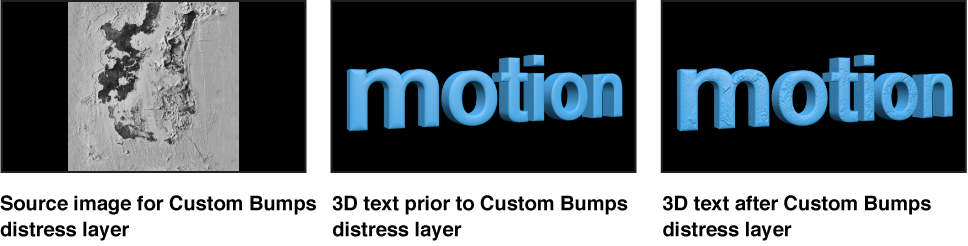
This option lets you select an image to serve as the texture map for the selected object.
Bump map gain: A slider to increase or decrease the contrast of the selected image, giving the effect of larger or smaller bumps.
Image: An image well to assign a custom image to use as the bump map. Drag an image from the Layers list or Media list into this well.
Bump Map Type: A pop-up menu to set whether the bump map is interpreted as Height, which uses the luminance of an image to define the bump pattern, or as Normal, which uses an RGB map image to define the bump pattern.
Invert: A checkbox that, when selected, swaps the light and dark elements of the image, effectively inverting the apparent height of the bumps.
Wrap Mode: A pop-up menu to set what happens if the image is smaller than the text object. Choose from one of the following options:
None: The image is applied once, and areas of the text object that exceed the scope of the image are not covered.
Repeat: The image is applied and reapplied as often as necessary, creating a pattern to fill the area beyond the scope of the original image.
Mirror: The image is applied to the text object, then applied again in an inverted, reversed orientation to cover the area beyond the scope of the original image.
Placement: A group of controls (available when you click the disclosure triangle) to set how the texture is applied to the text object. For details, see Placement controls.
Blend Mode: A pop-up menu to set how multiple bump layers interact with each other. Choose one of two options:
Add: Uses a mathematical add operation, allowing the lighter areas of each layer to shine through.
Replace: Causes the top-most layer to appear wherever it overlaps with layers that occur below it in the Inspector.