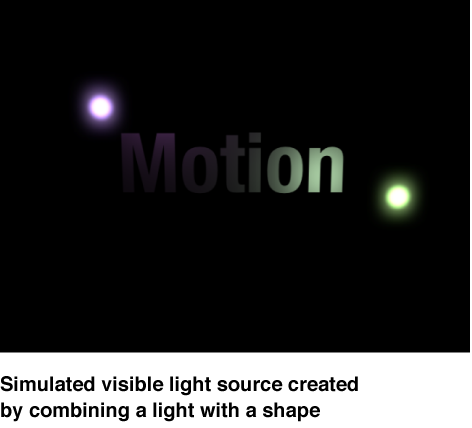

You can apply lighting to a motion graphics project to enhance the depth and scope of compositions, and to help create realistic environments for composites. Although light sources are not visible, you can simulate a visible light source by combining a point light with an image or shape, as shown in the example below.
Tip: Use the Match Move behavior to move a simulated light source with a light in a movie clip. For more information on the Match Move behavior, see Match move an object.
Motion’s lighting system works only on 3D groups (and the layers and groups nested within them). When you add lights to a scene, two groups of properties contribute to the appearance of lights:
Light properties: You can adjust the quality of a light itself by selecting a light object in your project, then modifying its parameters in the Light Inspector.
Object lighting properties: You can adjust how an image layer in your project (a still image, movie clip, shape, and so on) receives light cast by light objects by selecting the layer, then adjusting Lighting parameters in the Properties Inspector.
You can manipulate any of the following light properties: type of light, intensity, and color. A light bulb, the sun, and lighting in a dance club have different appearances. You can use lighting properties to simulate these differences. You can use multiple lights to mix color. If one red and one blue spot light are pointed at a white object, they mix to make magenta. Each type of light has its own attributes. It may take a combination of light types to achieve a specific effect. For example, you might want to combine a dim ambient light with a spot light to add depth or prevent total darkness where the spot light’s effect drops off.