
Light Type: A pop-up menu to specify any of four light types:
Ambient: Emits light in all directions, illuminating all objects in the scene from all directions equally. This type of light has no position and no representation in the Canvas. The most common use for ambient lights is to add an overall fill effect or color cast.
Note: There’s no global ambience property in Motion, so you may have to add an ambient light to prevent total blackness.
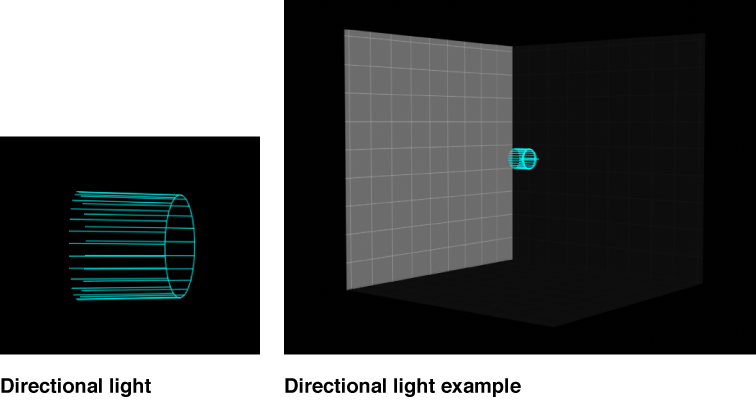
Directional: Emits parallel rays of light in a specified direction from a source located at an infinite distance. Rotate the directional light icon (a wireframe cylinder with one end removed) in the Canvas to change the direction in which the light is cast. The circle represents the back of the light, and the lines indicate the direction the light is traveling.
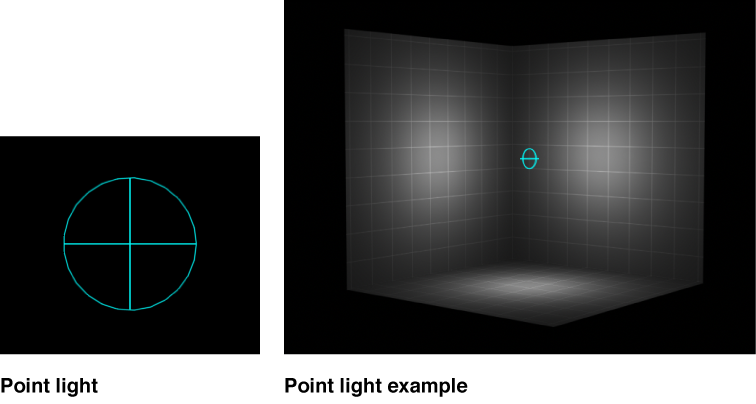
Point: Emits light outward from a single point in 3D space in all directions. Optionally, you can add falloff based on an object’s proximity to the light. This is the default light in Motion, and it produces results similar to that of an incandescent light bulb.
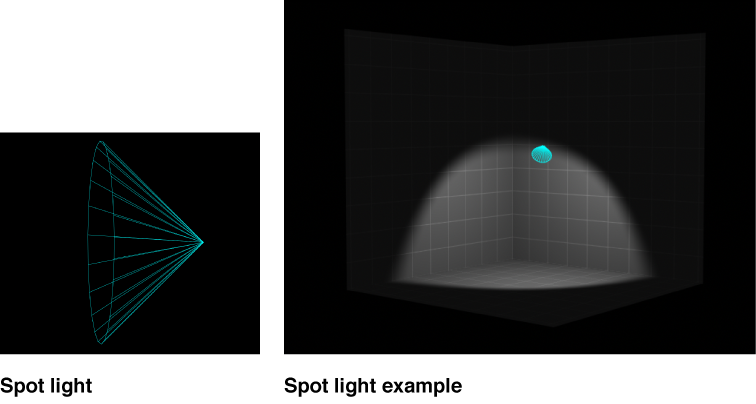
Spot: Emits light from a conical light source and casts an elliptical pattern on objects hit by the light. Using a spot light allows for a high degree of accuracy when you need to limit the area affected by the light.
Color: A standard set of controls to select the color of the light.
Intensity: A slider that acts as a dimmer switch for lighting. If you use a Directional light at 100% intensity pointed straight at a red object, the object looks red. If you lower the intensity, the object and scene get darker. However, if you increase the intensity above 100% you may begin to overexpose your scene, eventually causing the object to appear white. The Intensity value slider ranges from 0 and 400, but there’s no upper limit for Intensity (use the adjacent value slider to set a value above 400).
Note: Multiple lights interacting with an object combine to increase the object’s apparent brightness as they would in the real world. If you have two spot lights overlapping in space and pointing in the same direction with Intensity set to 100%, you see the same result as having a single spot light with its Intensity set to 200%.
Falloff Start: A slider to adjust where the falloff point of a light begins. In the real world, light falls off—or has less of an effect—as the distance from the light source increases. Usually falloff starts at the center of the light object. Setting Falloff Start adds additional control to your lighting. This parameter applies to light types that use a Position parameter (Point and Spot).
In the example below, a light is positioned slightly above the origin of the scene. There are three rings of cards at a distance of 200, 500, and 1000 units from the light. (In this example, a visible light source—the bulb at the center of the rings of cards—is simulated for illustrative purposes.) The light’s Intensity is set to 100% and Falloff is set to 10%. When Falloff Start is set to 0 (left, below), the light begins to fall off by the time it hits the innermost ring. When Falloff Start is set to 200 (right, below), the inner ring is lit at 100% intensity and the outer rings are slightly brighter than before.
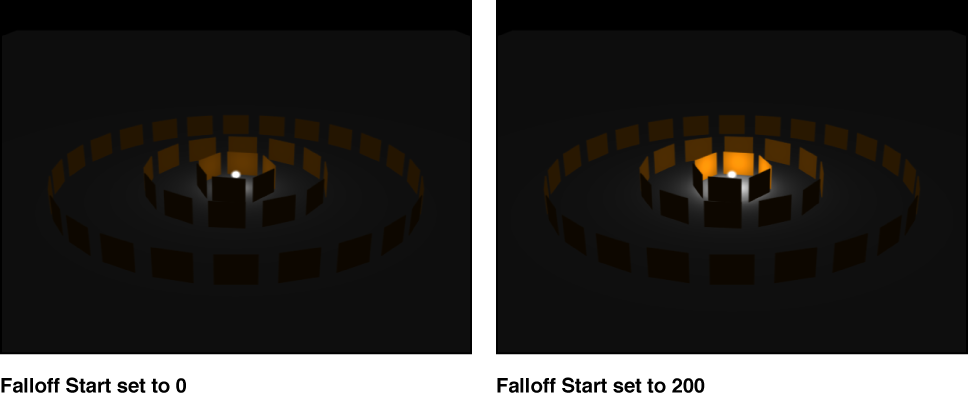
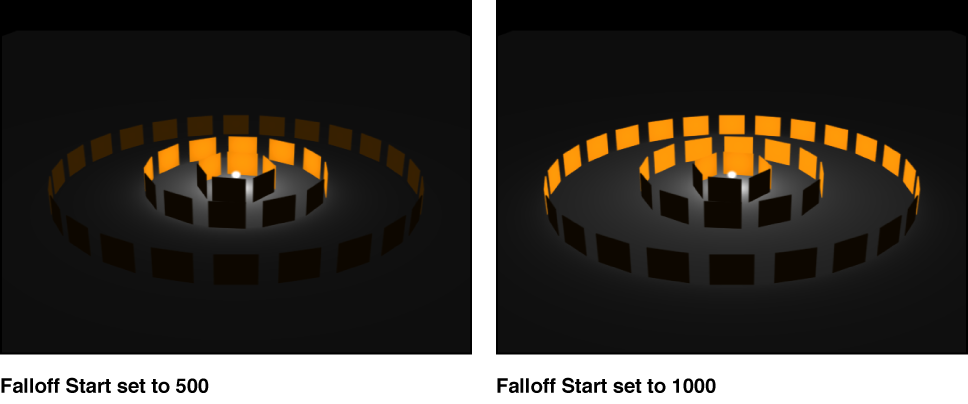
When Falloff Start is increased to 500 (left, below), the inner and middle rings are lit at 100% intensity, and the outer ring is brighter than before. Finally, when Falloff Start is set to 1000 (right, below), all rings are lit at 100% intensity.
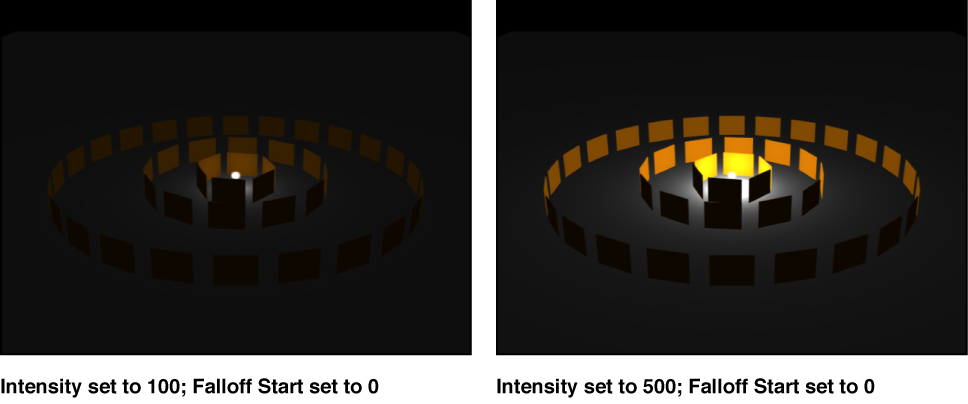
In the next example, the image on the left contains a light with Intensity set to 100%, while the image on the right has a light Intensity of 500%. In the image on the right, the outer rings are slightly brighter, but the innermost ring is overexposed. If the Falloff Start of the light in the image on the right is increased to 1000, the rings are overexposed.
Falloff: A slider to control the rate of falloff for a point or spot light based on the Falloff Start setting. At low values, light falls off over a long distance from the light source; therefore, the light travels farther in the image. At high values, the falloff occurs more rapidly.
Cone Angle: A dial that becomes available only when Light Type is set to Spot. The Cone Angle is measured from the center of the light outward and can be set to a value between 0 and 90 degrees. The distance of the light from its target affects the result of this parameter. If the light is close, a wider spot cone angle may be needed to light more of the object. If the light is farther away, a lower Cone Angle may be needed to isolate objects.
Soft Edge: A dial that becomes available only when Light Type is set to Spot. Like Cone Angle, this parameter can be set to a value between 0 and 90 degrees. Its starting point begins at the outer edge of the Cone Angle. If set to 0, spot lights have a hard edge. Low values produce a slight softening effect to the boundary of the lit area. Higher values produce a wide, more natural fade. Adding softness expands the area of your light, so you might need to adjust the angle to achieve a specific effect.
Note: Point lights, directional lights, and spot lights also contain a set of parameters to control how they cast shadows. For more information on these parameters, see Shadows overview.