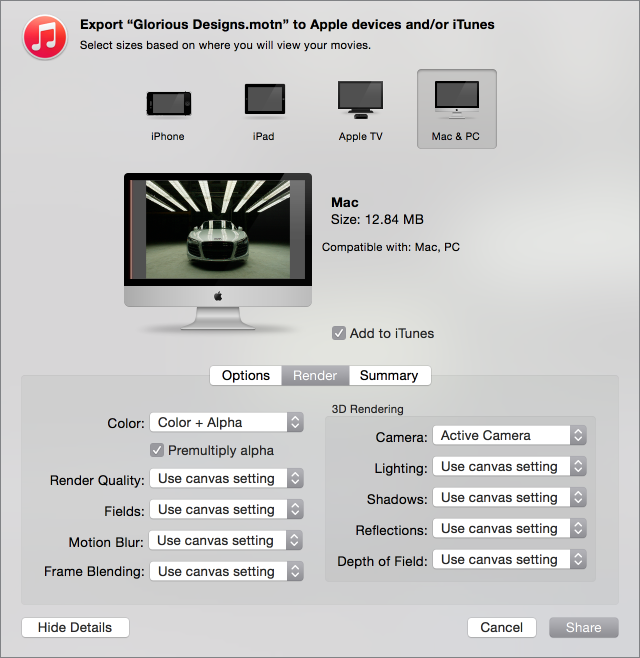

When sharing a Motion project, you can choose from different rendering options to balance image quality versus rendering time. These options, when available, are found in the Render pane of the Share window. (If you chose Share > Apple Devices and the Render pane is not visible, click Show Details.)
Basic rendering options
Use these options to choose the quality of your project’s output, as well as whether effects, such as motion blur and frame blending, appear in your project’s output.
Color: A pop-up menu that sets whether to output Color channels (RGB only, with no transparency), Alpha channel only, or Color + Alpha (RGB with transparency).
Note: Only some codecs support embedded alpha channels. If you’re outputting to a codec that doesn’t support alpha channels, no alpha channel is saved, regardless of the option you choose in this pop-up menu.
Premultiply Alpha: A checkbox that, when selected, mixes (via multiplication) semitransparent pixels with the project’s background in the exported file (when the project’s background color is black).
Render Quality: A pop-up menu that sets a Render Quality to Best, Normal, Draft, or Custom. The Render Quality setting affects the image quality of specific effects, but not the image as a whole. Choosing a lower render quality reduces render times, while choosing a higher render quality improves the quality of output. For more information, see Custom Canvas view options.
Fields: A pop-up menu that sets whether to render individual fields. Options include On (interlaced), Off (progressive), and “Use canvas setting.”
Motion Blur: A pop-up menu that sets whether to apply motion blur to moving objects. The options are On, Off, or “Use canvas setting.”
Frame Blending: A pop-up menu that sets whether to render frame blending to output smoother, higher-quality slow motion in your project. The options are On, Off, or “Use canvas setting.”
3D rendering options
Use these options to choose whether 3D effects, such as lighting, shadow, and reflections, appear in your 3D project’s output.
Camera: A pop-up menu to choose the cameras to use to render your project, if your project uses 3D layers.
Lighting: A pop-up menu that sets whether to render lighting effects. The options are On, Off, or “Use canvas setting.” Turning this option off reduces rendering time; however, lighting effects do not appear in the output.
Shadows: A pop-up menu to choose whether to render shadow effects. The options are On, Off, or “Use canvas setting.” Turning this option off reduces rendering time; however, shadow effects do not appear in the output.
Reflections: A pop-up menu to choose whether to render reflection effects. The options are On, Off, “Use canvas setting.” Turning this option off reduces rendering times; however, reflection effects do not appear in the output.
Depth of Field: A pop-up menu to choose whether to render depth of field effects. The options are On, Off, or “Use canvas setting.” Turning this option off reduces rendering times; however, depth of field effects will not appear in the output.