
Mask Controls
Roundness: A slider (available when a simple rectangle mask, Bezier mask, or B-Spline mask is selected) that adjusts the roundness of mask corners. Use this control to create rounded rectangles or to smooth the edges of a mask.
Preserve Scale: A checkbox (available when a simple rectangle mask, Bezier mask, or B-Spline mask is selected) that controls whether the Roundness setting is absolute or relative to the overall mask size. When the checkbox is selected, the roundness remains at the same approximate percentage of curvature as the object is scaled. When the checkbox is deselected, the curvature varies as the overall mask changes size.
Curvature: A slider (available when a simple circle mask is selected) that adjusts the degree of curvature of the circle. When set to 100 percent, the mask is elliptical. When set to 0 percent, the mask is a rectangular.
Radius: A slider (available when a simple circle mask is selected) that controls the width (X) and height (Y) of the mask. Click the disclosure triangle to reveal individual X (width) and Y (height) sliders.
Size: A slider (available when a simple rectangle mask is selected) that controls the size of the mask. Click the disclosure triangle to reveal individual Width and Height sliders.
Shape Type: A pop-up menu that sets the type of control points used to define the mask. For example, if you originally created a Bezier mask, you can choose B-Spline from this menu to change how the mask is drawn. Changing the shape type might dramatically change the mask’s form even though its control points remain fixed at their original coordinates. There are three options:
Linear: All of a mask’s control points are joined by hard angles, and the resulting mask is a polygon. The control points of a Linear mask lie directly on its edge.
Bezier: Control points can be a mix of Bezier curves and hard angles, creating any sort of mask. The control points of a Bezier mask lie directly on its edge.
B-Spline: Control points are all B-Spline points, with different degrees of curvature. B-Spline control points lie outside the surface of the mask, but are connected by the B-Spline frame.
Note: You can hide the B-Spline frame by deselecting the Lines menu item in the View pop-up menu above the Canvas.
Mask Blend Mode: A pop-up menu that determines how a mask interacts with the alpha channel of the layer to which it’s applied. When a layer has multiple masks, each mask can have a different Mask Blend Mode. When this happens, each mask adds to, or subtracts from, the layer’s alpha channel according to the selected mode. The final alpha channel is the combined result of all masks applied. There are four menu options:
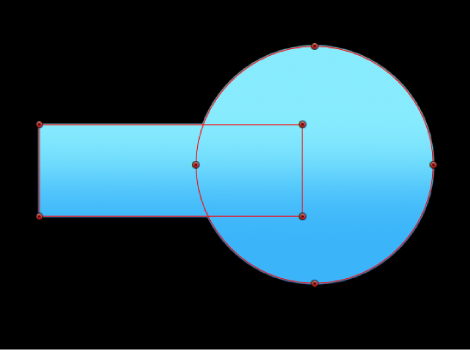
Add: Removes all pixels from areas outside the mask shape. Each new mask adds more transparency, letting more of the underlying image show through. The Add blend mode (the default for new masks) is useful for adding back regions of an image that other masks are cutting out or when masking multiple areas that do not intersect in a single image. In the following example, both the rectangle and circle masks remove areas outside of the mask shapes, revealing the underlying black Canvas.
If the layer contains an alpha channel, a mask set to Add mode reveals only the masked section of the original alpha channel.
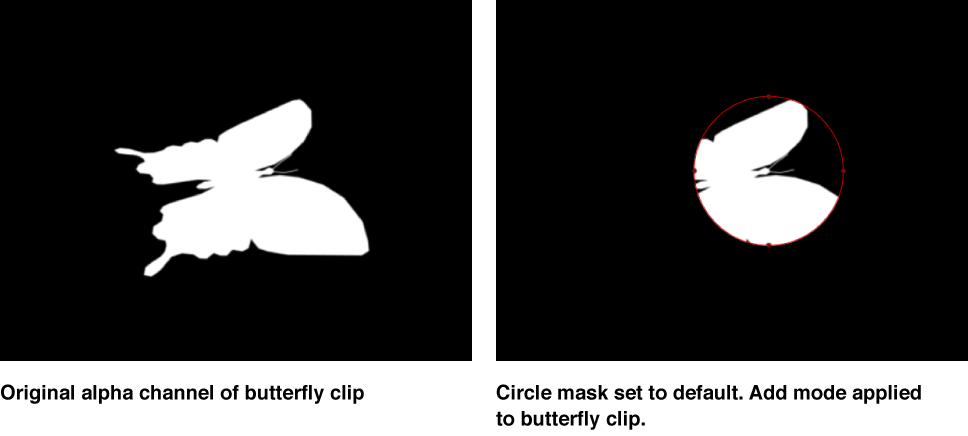
Note: To display the rest of a masked layer so you can trace it to create a second mask, turn off the first mask in the Layers list or Timeline. The outline of the first mask remains visible, even though it’s no longer affecting the layer’s transparency.
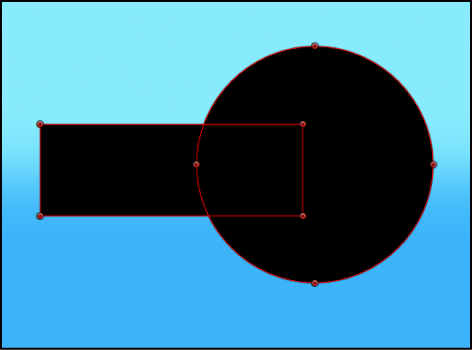
Subtract: Removes all pixels from the area inside the mask shape, effectively punching a hole in the image. In the following example, the rectangle and circle masks punch a hole through the blue gradient object, revealing the underlying black Canvas.
Replace: Completely replaces the image object’s alpha channel as well as any other masks that appear beneath the mask in the Layers list. In the following example, the circle mask overrides the rectangle mask, because the circle mask (set to Replace) appears above the rectangle mask in the Layers list. For more information, see About combining multiple masks.
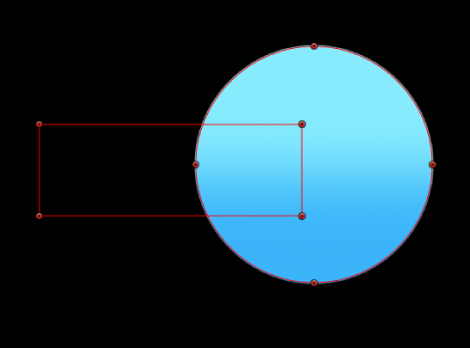
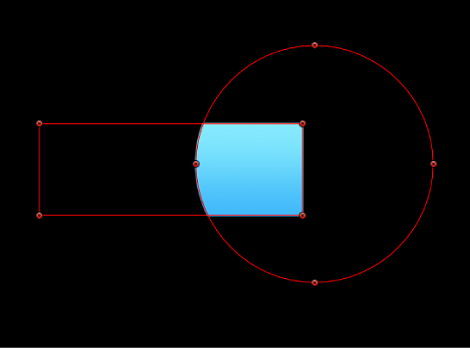
Intersect: Shows pixels only in regions where masks overlap. In the following example, only the overlapping areas of the rectangle and circle masks are visible.
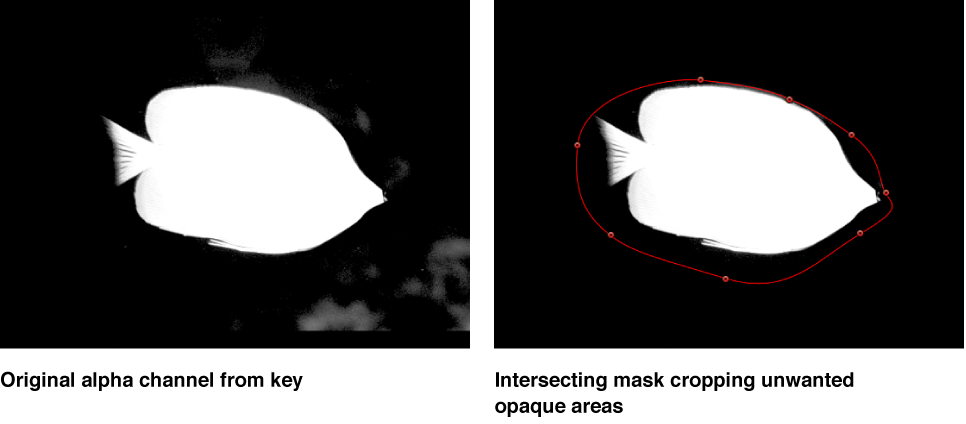
In another example, if you import a TIFF file with an alpha channel and you want to cut out part of it without losing alpha information, you must use the Intersect blend mode. This is also true for layers with keying filters applied.
Invert Mask: A checkbox that, when selected, reverses the mask—swapping its solid and transparent areas. This is useful if you need to switch the solid and transparent areas of an existing mask.
Tip: You can apply different filters and effects to the foreground and background of an image by first masking the foreground subject, duplicating the layer and its mask, then inverting the duplicate layer’s mask. Effects applied to the background can then be completely isolated from the foreground, or vice versa. You can adjust the opacity of a mask in the Properties Inspector.
Feather: A slider that feathers (softens) the edges of a mask. Positive feathering values soften the edge of the mask from its edge outward. Negative feathering values soften the edge of a mask inward from the edge. Feathering the edge of a mask can soften a harsh rotoscoping job, making the masked object blend more easily with the background.
Falloff: A slider that controls how “steep” the feathering is. Higher values result in feathering that’s pushed farther inward, so the edge of the feathering effect is more transparent. Lower values result in the “core” of the feathering effect being pushed farther outward, so the edge of the feathering effect is less transparent.
Mask Color: A pop-up menu that controls the color of the mask as displayed in the Canvas when it’s selected. This setting has no effect on the final output. Setting masks to different colors may aid you in identifying which mask is which.
Convert to Points: A button (available when a simple mask is selected) that, when clicked, converts a simple mask to a complex mask with editable control points. For more information, see Convert a simple shape or mask to editable control points.