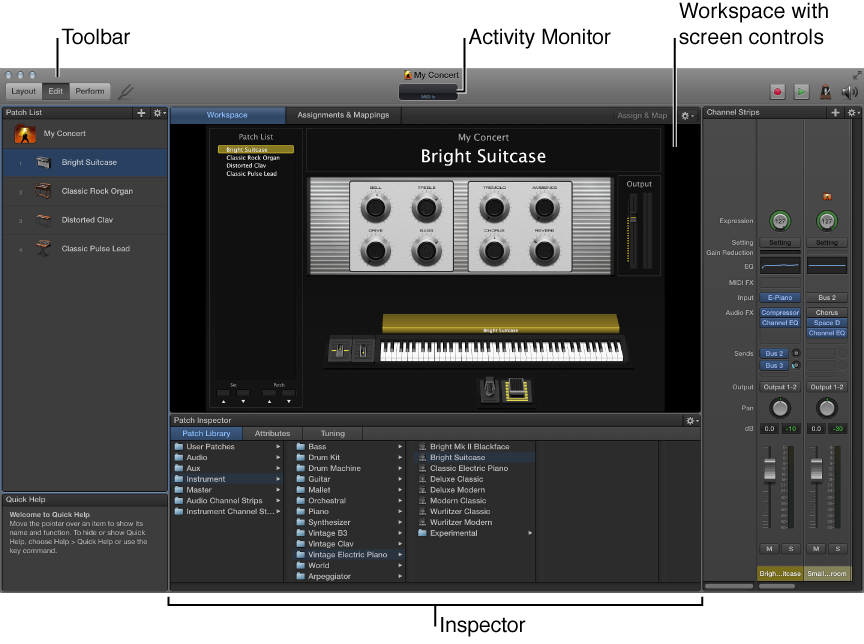

You do all your work in MainStage in a single window. The MainStage window makes it easy to work with your patches and your concert’s layout. When you open MainStage, the workspace fills the center of the window, with inspectors and other editing areas on the sides and below. When you are ready to perform, you can choose Perform mode to maximize computer performance and display space for easy viewing on stage.
The main features of the MainStage window include:
Toolbar: Includes buttons for quick access to common commands and tools.
Activity Monitor: Shows your computer’s processor and memory usage, and shows the input from your MIDI devices as you edit and perform.
Workspace: The “canvas” where you customize your onscreen layout, assign hardware controls to screen controls, and view your concerts while you perform. You can also view assignments and mappings for the concert.
Screen controls: The onscreen objects that correspond to the controls on your hardware devices. You can add and arrange screen controls in the workspace, assign hardware controls to screen controls, and then map them to parameters you want to control for each patch in your concert.
Channel strips: Channel strips are where you build and customize your sounds. MainStage channel strips feature Insert, Sends, and I/O menus as well as level meters, faders, pan knobs, and other controls.
Inspectors: Inspectors appear below (in Edit mode) or along the left side of the MainStage window (in Layout mode) when you select different items onscreen. The inspectors allow you to edit parameters and attributes for patches, sets, screen controls, channel strips, and the concert. Most inspectors feature tabs that make it easy to quickly access the parameters you want to edit.
To make working easier, MainStage features three different modes, each suited to a different task. Some features are common to all modes, while others are exclusive to a particular mode.
You audition, edit, and organize your sounds and map screen controls in Edit mode.
You customize the visual arrangement of controls onscreen and make controller assignments in Layout mode.
You use Perform mode when you perform live.