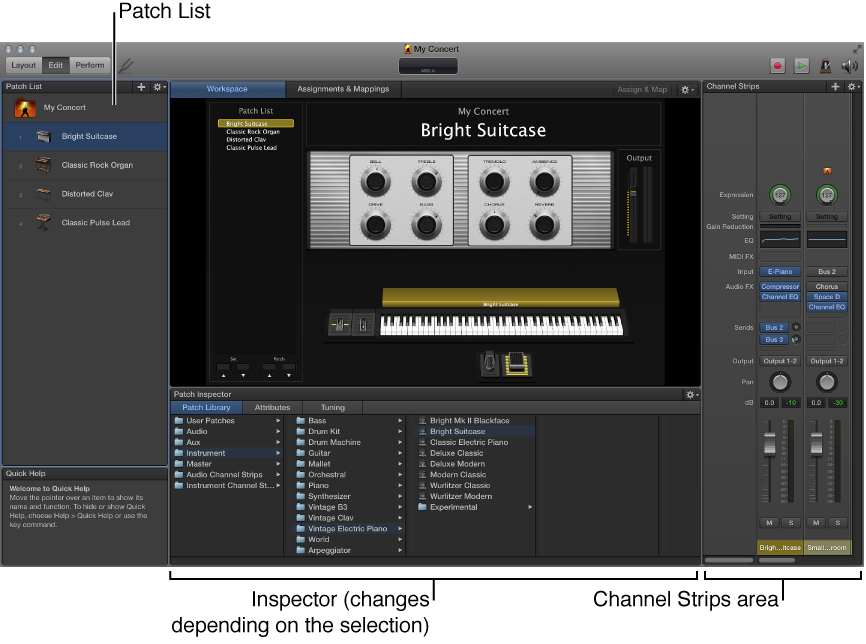

Edit mode is where you create, edit, and organize your sounds. You can add patches, add and edit channel strips, create keyboard layers and splits, and edit channel strip and plug-in parameters. You also map screen controls to channel strip parameters and actions and edit patch, set, and concert-level parameters in Edit mode.
Patch List: Shows the patches and sets in the concert. You can add patches and sets to the Patch List, name them, and organize them. The Patch List includes an Action pop-up menu with commands to create patches and sets, reset program change numbers, skip items, and import and export patches and sets to use in other concerts.
Inspector: View and edit parameters for the currently selected patch, channel strip, screen control, set, or for the concert. The name of the inspector indicates the type of item you are currently inspecting.
Channel Strips area: View and edit the channel strips in your patches or at the concert or set level. Channel strips appear in a vertical format with volume, pan, and other mixer controls. You can also add channel strips and save channel strip settings.
Assignments & Mappings tab: Shows the assignments and mappings for the selected patch, set, or concert. You can create new assignments and mappings, edit existing ones, and edit the hardware input settings for an assignment.
For information about working in Edit mode, see Edit mode overview.