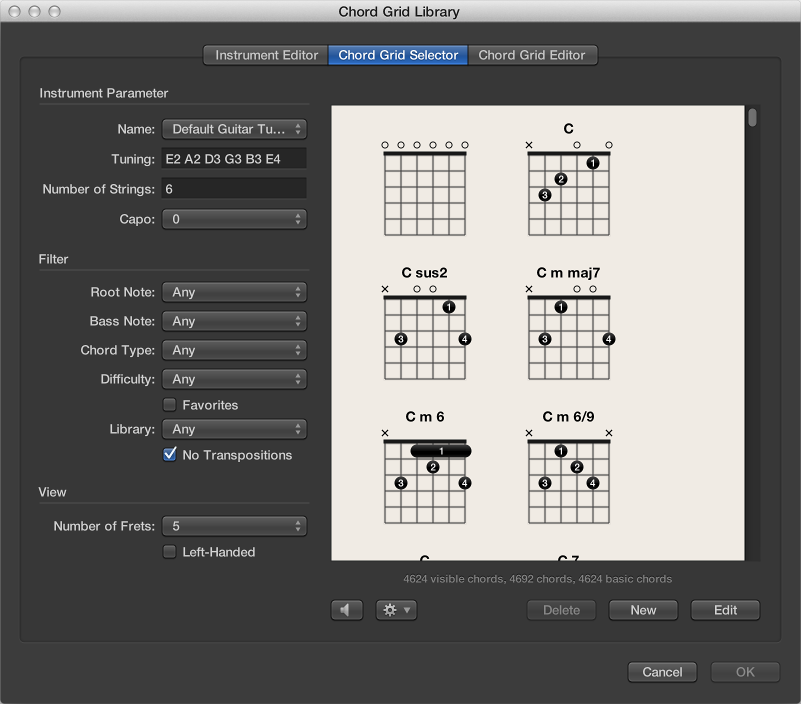

You can select and filter individual chord grids from your instrument tunings and chord grid libraries in the Chord Grid Selector.
The Chord Grid Selector includes the following parameters:
Instrument parameters
Name pop-up menu: Choose the name of the instrument tuning you want to use.
Tuning field: Displays the default tuning for the chosen instrument.
Number of Strings field: Displays the default number of strings for the chosen instrument.
Capo pop-up menu: Choose the fret on which to place the Capo. Choose 0 to play at the original chord, 1 to place a Capo on the first fret, and so on.
Filter parameters
Root Note pop-up menu: Filter the chord grids according to root note.
Bass Note pop-up menu: Filter the chord grids according to bass note.
Chord Type pop-up menu: Filter the chord grids according to chord type.
Difficulty pop-up menu: Filter the chord grids according to difficulty.
Favorites checkbox: Filter the chord grids according to those tagged as favorites.
Library pop-up menu: Filter the chord grids according to library (those libraries that are linked to the chosen tuning).
No Transpositions checkbox: Filter the chord grids according to transposition.
View parameters
Number of Frets pop-up menu: Choose the number of frets (four, five, or six) to be shown in the chord grids.
Left-Handed checkbox: Change the chord grid display to suit left-handed users.
Other parameters
Playback button: Click to listen to a selected chord grid.
Action pop-up menu: Choose how the chord grid strings are played back and at what tempo.
Chord: All strings are played back simultaneously.
Arpeggio Up, Arpeggio Down: Each string is played back one after the other.
Slow, Medium, Fast: Choose the playback tempo.
Delete button: Click to delete a non-factory chord grid.
New button: Click to create a new chord grid. The Chord Grid Editor pane opens and shows an empty chord grid.
Edit button: Click to edit a selected chord grid. The Chord Grid Editor pane opens and shows the selected chord grid.
Note: This same edit action can be triggered by double-clicking a chord grid in the Chord Grid Selector.
For information about inserting and editing chord grids, see Insert and edit chord grids in the Score Editor.