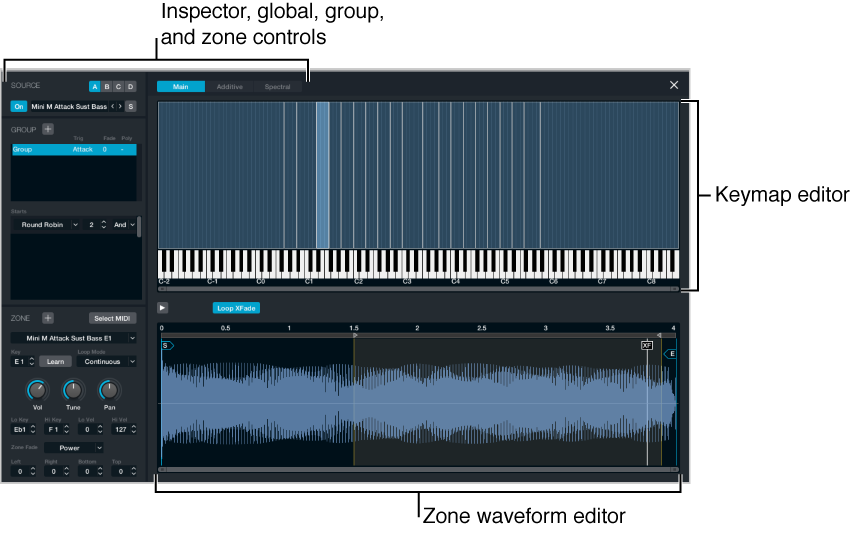

Source components are shown only in advanced view. Click the Advanced button to switch to advanced view, then click the A/B/C/D button to view detailed parameters for the selected source.
The source edit window is opened by clicking the Edit button on any source subpage. Click the close window icon (X) at the top right to close the window.
By default, the Main edit window is shown. Further Additive and Spectral edit windows can be opened by clicking the buttons at the top of the window. These windows provide additional parameters that let you precisely edit and sculpt your sounds. See Additive edit window overview and Spectral edit window.
The Main edit window is divided into three areas that interact with each other. You can edit parameters graphically in the keymap or waveform editor or can use corresponding fields and other parameters in the inspector.
Inspector: This area shows global parameters, group functions, and zone parameters. See Inspector global controls, Inspector group controls, and Inspector zone controls.
Keymap editor: A graphical representation of, and editor for, sample zones. This area interacts with the parameters in the zone section of the inspector. See Keymap editor.
Zone waveform editor: A graphical representation of, and editor for, the waveform used in each sample zone. See Zone waveform editor.