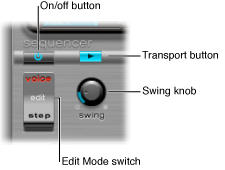

The following parameters apply globally to all patterns.
Global sequencer parameters
On/Off button: Turn the step sequencer on or off.
Edit mode switch: Select either Voice or Step mode.
Voice mode (default): In Voice mode, editing a drum sound’s parameters changes the drum sound itself.
Step mode: In Step mode, you can automate a sound’s parameters from one step to the next. See Ultrabeat step automation overview.
Transport button: Start and stop the sequencer pattern. The step sequencer is always synchronized to the host application tempo.
Note: If the Transport button is blue, the step sequencer interprets incoming MIDI notes between C-1 and B0 as performance information. See MIDI control of Ultrabeat’s step sequencer.
Swing knob: Rotate to set the swing intensity for all sounds that have the Swing function turned on. See Use Ultrabeat’s swing function.