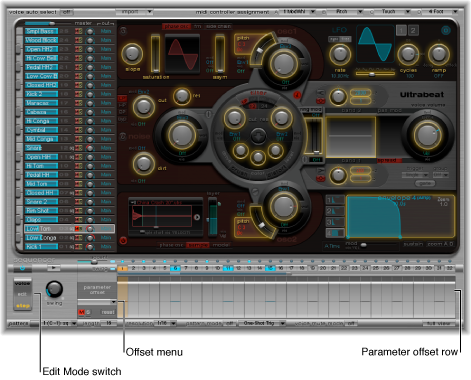

Click the Edit Mode switch to turn on Ultrabeat’s step automation feature. Step automation lets you program parameter changes on a per-step basis for each drum sound. Sound parameters that can be automated include all functions in the Synthesizer section except:
Menus (modulation routings and so on)
Buttons (oscillator-type buttons, the buttons in the trigger/group section)
Pan/Spread parameters
When you turn on Step mode, Ultrabeat’s interface changes in the following ways:
Yellow frames appear around all parameters that can be automated in the Synthesizer section. Parameters that cannot be automated are still visible but are disabled.
The velocity/gate row in the Step grid changes to show the (parameter) offset row.
Tip: When creating offsets in step mode, you may want to make a change to the original drum sound. Rather than switching back and forth between edit modes for this adjustment, you can press Command-Option to temporarily flip Ultrabeat back into Voice mode.