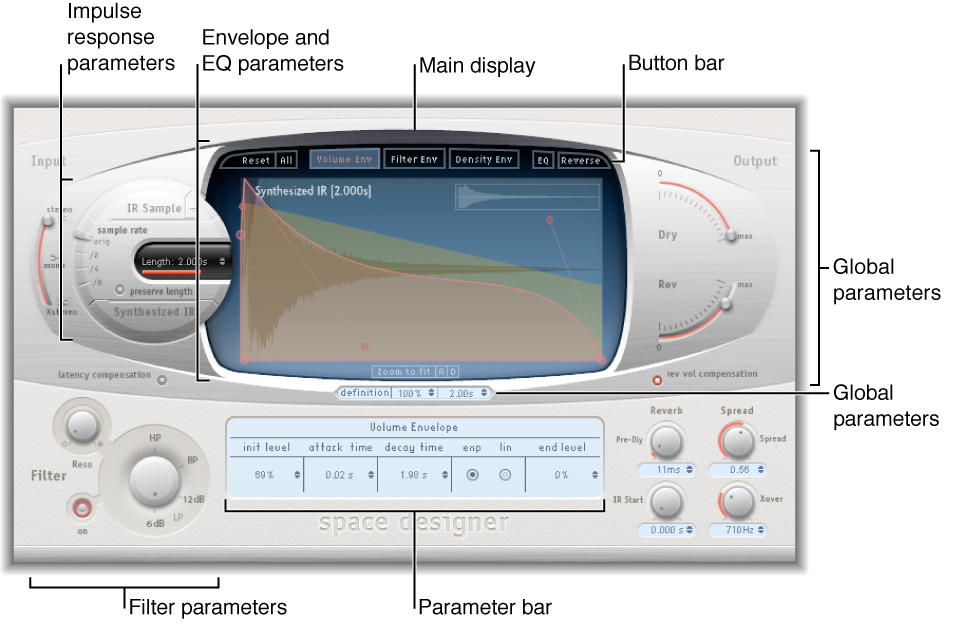

The Space Designer interface consists of the following main sections:
Impulse response parameters: Use to load, save, or manipulate recorded or synthesized impulse response files. The chosen impulse response file determines what Space Designer uses to convolve with your audio signal. See Use impulse responses.
Envelope and EQ parameters: Use the view buttons in the button bar to switch the main display and parameter bar between envelope and EQ views. Use the main display to edit the displayed parameters graphically, and use the parameter bar to edit them numerically. See Space Designer envelopes and EQ overview.
Filter parameters: Use to modify the timbre of the Space Designer reverb. You can choose from several filter modes, adjust resonance, and also adjust the filter envelope dynamically over time. See Space Designer filter parameters.
Global parameters: After your impulse response is loaded, use these parameters to determine how Space Designer operates on the overall signal and impulse response. Included are input and output parameters, delay and volume compensation, predelay, and so on. See Space Designer global parameters overview.