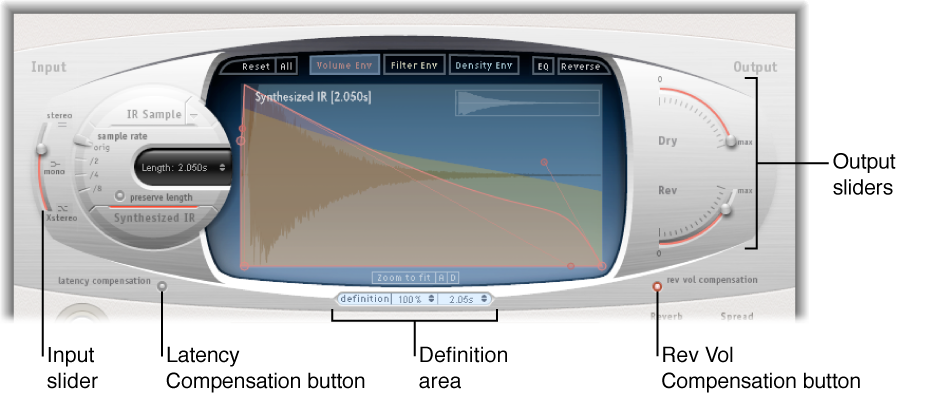

The global parameters affect the overall output or behavior of the effect. See Use Space Designer global parameters and Use Space Designer output parameters.
The global parameters are divided into two sections—those around the main display and those below the main display.
Global parameters (upper)
Input slider: Determine how Space Designer processes a stereo or surround input signal.
Latency Compensation button: Turn on or off the internal latency compensation feature.
Definition fields: Select a less-defined impulse response set, to emulate reverb diffusion and save CPU resources.
Reverb Volume Compensation button: Turn on the internal impulse response volume matching function.
Output sliders: Adjust output levels for the dry and wet (effect) signal.
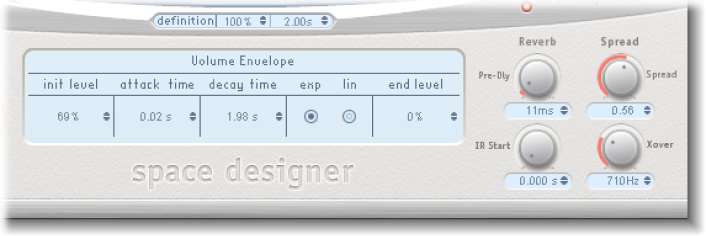
Global parameters (lower)
Pre-Dly knob and field: Set the reverb pre-delay time, or time between the original signal and the first reflections from the reverb.
IR Start knob and field: Set the playback start point in the impulse response sample.
Spread/Xover knobs and fields: The Spread knob sets the perceived width of the stereo or surround field. The Xover knob sets the crossover frequency. Any synthesized impulse response frequency that falls below this value is affected by the Spread parameter. (These knobs are available only for synthesized impulse responses.)