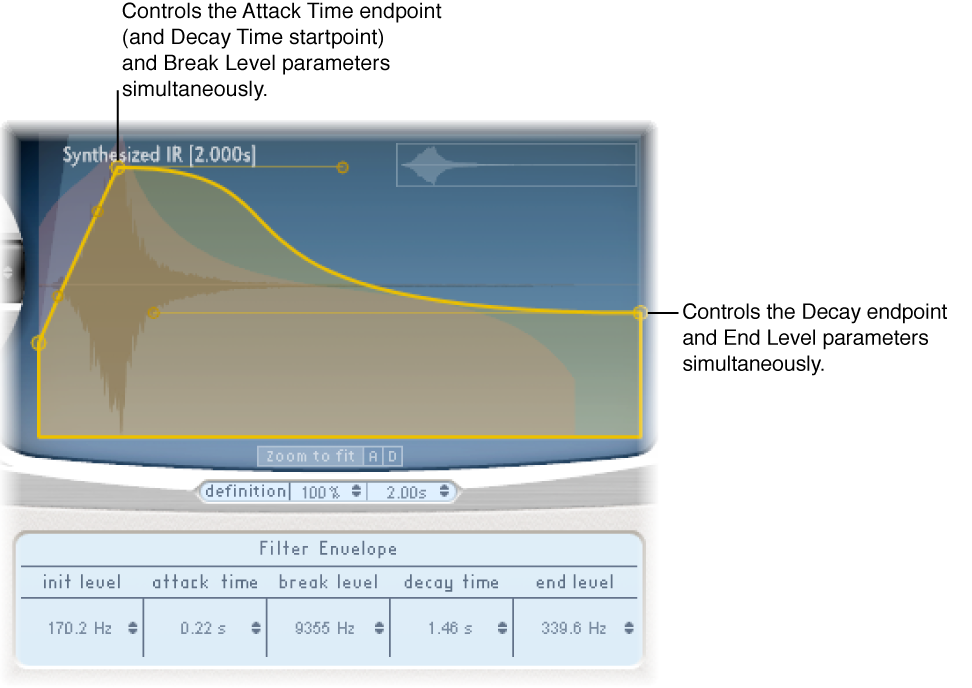

The filter envelope appears in the main display when you click the Filter Env button. You can use it to control the filter cutoff frequency over time. You can adjust all filter envelope parameters either numerically in the parameter bar or graphically in the main display using the techniques discussed in Edit Space Designer envelope parameters.
Note: Activation of the filter envelope automatically enables the main filter.
Filter envelope parameters
Init Level field: Set the initial cutoff frequency of the filter envelope.
Attack Time field: Determine the time required to reach the Break Level.
Break Level field: Set the maximum filter cutoff frequency that the envelope reaches. This setting also acts as the separation point between the attack and decay phases of the overall filter envelope. In other words, when the selected level has been reached after the attack phase, the decay phase begins. You can create interesting filter sweeps by setting the Break Level to a value lower than the Init Level.
Decay Time field: Determine the time required after the Break Level point to reach the End Level value.
End Level field: Set the cutoff frequency at the end of the filter envelope decay phase.