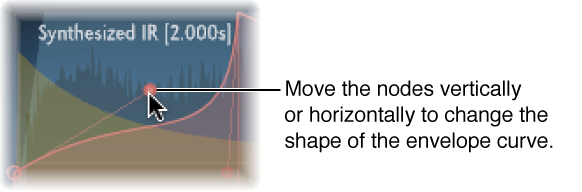

You can edit the volume and filter envelopes of all impulse responses and the density envelope of synthesized impulse responses. All envelopes can be adjusted both graphically in the main display as well as numerically in the parameter bar.
Whereas some parameters are envelope-specific, all envelopes consist of the Attack Time and Decay Time parameters. The combined total of the Attack Time and Decay Time parameters is equal to the total length of the synthesized or sampled impulse response, unless the Decay time is reduced. See Use impulse responses.
The large nodes are value indicators of the parameters shown in the parameter bar below the main display—Init Level, Attack Time, Decay Time, and so on. If you edit any numerical value in the parameter bar, the corresponding node moves in the main display.
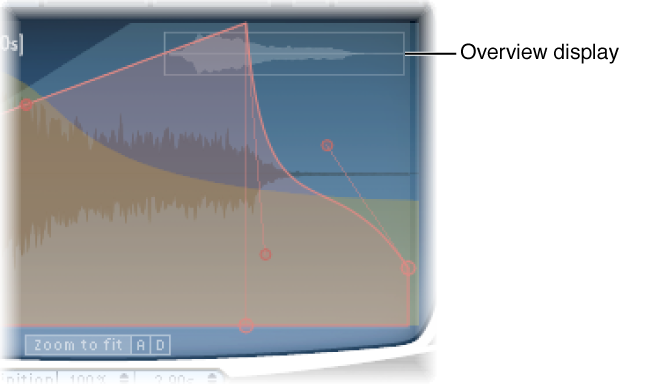
When displaying envelopes, the main display offers the following zoom and navigation parameters (not shown in EQ view).
Envelope navigation parameters
Overview display: Indicates which portion of the impulse response file is currently visible in the main display. This helps you to orient yourself when zooming.
Zoom to Fit button: Display the entire impulse response waveform in the main display. Any envelope length changes are automatically reflected.
A and D buttons: Limit Zoom to Fit to the attack and decay portions of the selected envelope shown in the main display. The A and D buttons are available only when you are viewing the volume and filter envelopes.
Drag the node in one of the available directions.
Two arrows are shown when you move the pointer over any node in the main display, indicating possible movements.
Drag the envelope curve in the main display.
Drag the small nodes attached to a line for fine adjustments to envelope curves. These nodes are tied to the envelope curve itself, so you can view them as envelope handles.