Use Space Designer global parameters

Space Designer global parameters affect the overall output or behavior of the plug-in. See Space Designer global parameters overview.

The tasks below cover the use of Space Designer global parameters.

Use the Space Designer Input slider

The Input slider behaves differently in stereo to stereo and surround configurations. (The slider does not appear in mono or mono to stereo instances of the effect.)
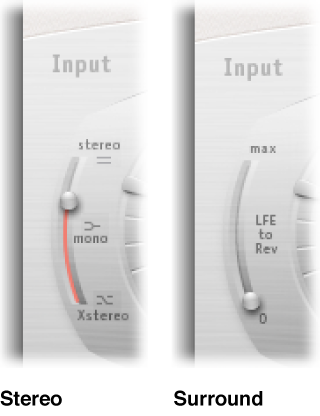
Figure. Input sliders, shown in stereo and surround modes.

Use the Space Designer latency compensation feature

The complex calculations made by Space Designer take a small amount of time, which results in a processing delay, or latency, between the direct input signal and the processed output signal.

Note:  This compensation feature is not related to latency compensation in the host application; it occurs entirely within Space Designer.

Use the Space Designer Definition parameter

The Definition parameter emulates the diffusion of natural reverb patterns. When used at values of less than 100% it also reduces CPU processing requirements.

Natural reverbs contain most of their spatial information in the first few milliseconds. Toward the end of the reverb, the pattern of reflections—signals bouncing off walls, and so on—becomes more diffuse. In other words, the reflected signals become quieter and increasingly nondirectional, containing far less spatial information. To emulate this phenomenon, use the full impulse response resolution only at the onset of the reverb, then use a reduced impulse response resolution toward the end of the reverb.

Figure. Definition parameter.

Use the Space Designer reverb volume compensation feature

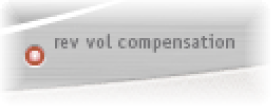
The reverb volume compensation feature attempts to match the perceived—not the actual—volume differences between impulse response files. The rev vol compensation button is turned on by default and should generally be left in this mode, although it may not work with all types of impulse responses.

Figure. Reverb volume compensation button.

Use the Space Designer predelay feature

Predelay is the amount of time that elapses between the original signal and the initial early reflections of the reverberation. For a room of any given size and shape, predelay is determined by the distance between the listener and the walls, ceiling, and floor. Space Designer allows you to adjust this parameter over a greater range than what would be considered natural.

The ideal predelay setting for different sounds depends on the properties of—or more accurately, the envelope of—the original signal. Percussive signals generally require shorter predelays than signals where the attack fades in gradually, such as strings. A good rule of thumb is to use the longest predelay possible before undesirable side effects, such as an audible echo, begin to materialize.

In practice, an extremely short predelay tends to make it difficult to pinpoint the position of the signal source. It can also color the sound of the original signal. On the other hand, an excessively long predelay can be perceived as an unnatural echo. It can also divorce the original signal from its early reflections, leaving an audible gap between the original and reverb signals.

These guidelines are intended to help you design realistic-sounding spaces that are suitable for various signals. If you want to create unnatural sound stages or otherworldly reverbs and echoes, experiment with the Pre-Dly parameter.

Change the impulse response start point

Using the IR Start parameter affords a number of other options that can be quite creative, particularly when combined with the Reverse function. See Space Designer button bar.

Note:  The IR Start parameter is neither available nor necessary in Synthesized IR mode, because the Length parameter provides identical functionality.