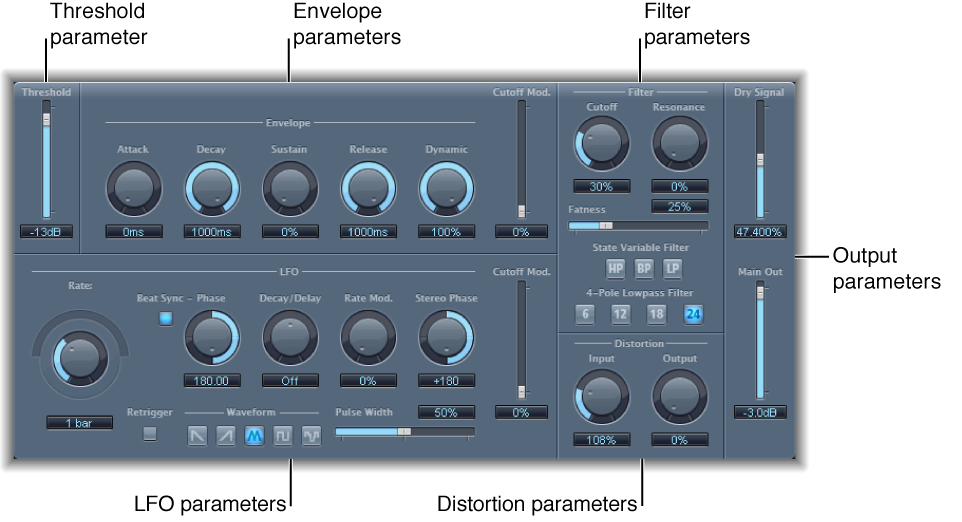

AutoFilter is a versatile filter effect with several unique features. You can use it to create classic, analog-style synthesizer effects, or as a tool for creative sound design.
The effect works by analyzing incoming signal levels through use of a threshold parameter. Any signal level that exceeds the threshold is used as a trigger for a synthesizer-style ADSR envelope or an LFO (low frequency oscillator). These control sources are used to dynamically modulate the filter cutoff.
The AutoFilter allows you to choose between different filter types and slopes, control the amount of resonance, add distortion for more aggressive sounds, and mix the original, dry signal with the processed signal.
The main areas of the AutoFilter window are the Threshold, Envelope, LFO, Filter, Distortion, and Output parameter sections.
Threshold slider and field: Set an input level that—if exceeded—triggers the envelope or LFO that dynamically modulates filter cutoff frequency. See AutoFilter threshold.
Envelope parameters: Define how the filter cutoff frequency is modulated over time. See AutoFilter envelope.
LFO parameters: Define how the filter cutoff frequency is modulated by the LFO. See AutoFilter LFO.
Filter parameters: Control the tonal color of the filtered sound. See AutoFilter filter.
Distortion parameters: Distort the signal both before and after the filter. See AutoFilter distortion.
Output parameters: Set the level of both the dry and effect signal. See AutoFilter output.