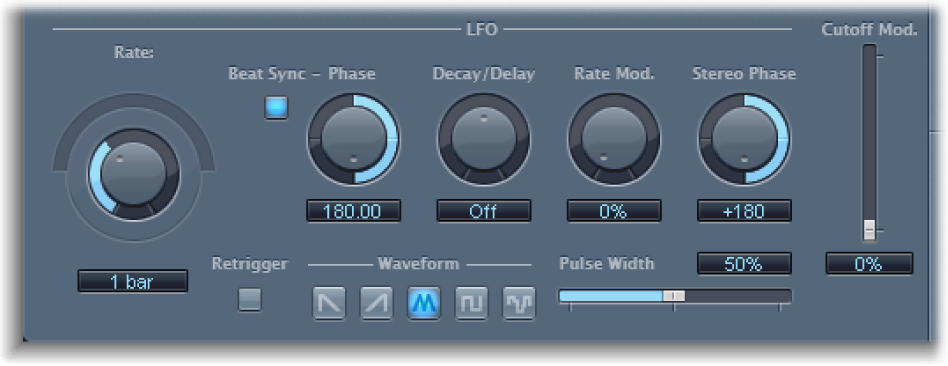

The LFO is used as a modulation source for filter cutoff.
LFO parameters
Coarse Rate slider and field: Set the speed of LFO modulation.
Note: The labels shown for the Rate knob, slider, and field change when you activate Beat Sync. Only the Rate knob and field are then available.
Fine Rate knob: Fine-tune the LFO modulation frequency.
Beat Sync button: Synchronize the LFO to the host application tempo. You can choose from bar values, triplet values, and more by using the Rate knob and field.
Phase knob and field: When Beat Sync is active, rotate to set the phase relationship between the LFO rate and the host application tempo. This parameter is dimmed when Beat Sync is disabled.
Decay/Delay knob and field: Set the time it takes for the LFO to go from 0 to its maximum value.
Rate Mod. knob and field: Set the LFO frequency, independent of the input signal level. Typically, when the input signal exceeds the threshold, the modulation width of the LFO increases from 0 to the Rate Mod. value. This parameter allows you to override this behavior.
Stereo Phase knob and field: Set the phase relationship of the LFO modulations between the two channels (stereo only).
Cutoff Mod. slider and field: Determine the impact of the LFO on the cutoff frequency.
Retrigger button: Start the LFO waveform at 0 each time the threshold is exceeded.
Waveform buttons: Select the shape of the LFO waveform. Choose from: descending sawtooth, ascending sawtooth, triangle, pulse wave, or random.
Pulse Width slider and field: Alter the curve shape of the selected waveform.