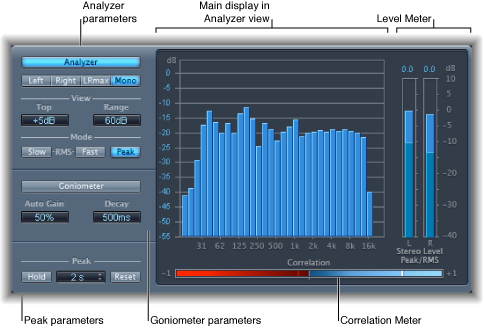

MultiMeter provides a collection of professional gauge and analysis tools in a single window. It includes:
An Analyzer to view the level of each 1/3-octave frequency band
A Goniometer for judging phase coherency in a stereo sound field
A Correlation Meter to spot mono phase compatibility
An integrated Level Meter to view the signal level for each channel
You can view either the Analyzer or Goniometer results in the main display area. You switch the view and set other MultiMeter parameters with the controls on the left side of the window.
Although you can insert MultiMeter directly into any channel strip, it is more commonly used in the master channel strip of Logic Pro X—when you are working on the overall mix.
There is also a surround version of MultiMeter, with parameters for each channel and a slightly different layout. See Surround MultiMeter overview.