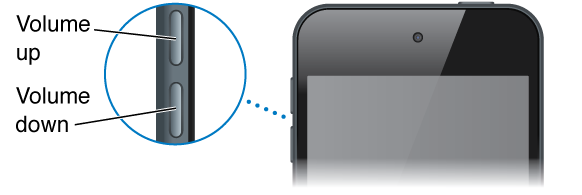
When you listen to songs, movies, or other media, the buttons on the side of iPod touch adjust the audio volume. Otherwise, the buttons control the volume for alerts and other sound effects.
WARNING: For important information about avoiding hearing loss, see Important safety information.
Lock the ringer and alerts volume. Go to Settings > Sounds and turn off “Change with Buttons.” To limit the volume for music and videos, go to Settings > Music > Volume Limit.
Note: In some European Union (EU) countries, iPod touch may warn that you’re setting the volume above the EU recommended level for hearing safety. To increase the volume beyond this level, you may need to briefly release the volume control. To limit the maximum headset volume to this level, go to Settings > Music > Volume Limit. To prevent changes to the volume limit, go to Settings > General > Restrictions.
See the audio playback controls. When iPod touch is locked or when you’re using another app, swipe up from the bottom edge of the screen to open Control Center.
Use Do Not Disturb. To silence FaceTime calls, alerts, and notifications, swipe up from the bottom edge of the screen to open Control Center, then tap  . See Do Not Disturb.
You can also use either volume button to take a picture or record a video. See Take photos and videos.