Make it square: Choose Square.
Apply a filter: Tap  to apply different color effects, such as black & white. To turn off a filter, tap , then tap None. You can also apply a filter later, when you edit the photo. See Edit photos and trim videos.
Camera offers several modes, which let you shoot stills, square-format photos, videos, and on models with an iSight camera, panoramas.
Choose a mode. Drag the screen left or right to choose Video, Photo, Square, or Pano.
Take a photo. Choose Photo, then tap the shutter button or press either volume button—handy for shooting in landscape orientation and stabilizing the camera.
Make it square: Choose Square.
Apply a filter: Tap to apply different color effects, such as black & white. To turn off a filter, tap , then tap None. You can also apply a filter later, when you edit the photo. See Edit photos and trim videos.
A rectangle briefly appears where the exposure is set. When you photograph people, face detection balances the exposure across up to 10 faces. A rectangle appears for each face detected.
Exposure is automatic, but you can set the exposure manually for the next shot by tapping an object or area on the screen. With an iSight camera, tapping the screen sets the focus as well as the exposure. Face detection is temporarily turned off. To lock the exposure and focus until you tap the screen again, touch and hold until the rectangle pulses.
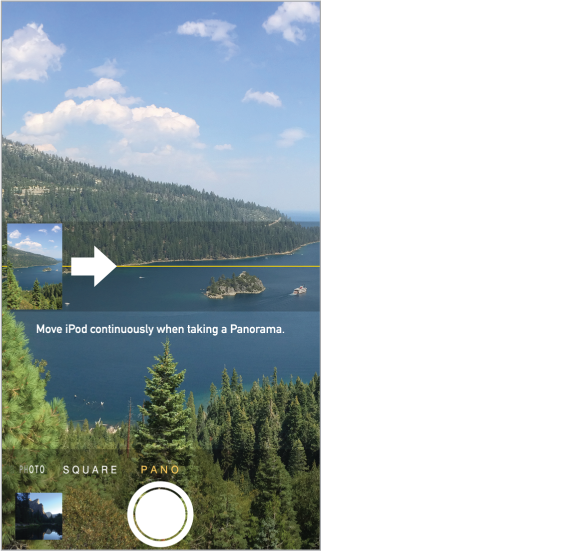
Take a panorama photo. (iSight camera) Choose Pano, tap the shutter button, then pan slowly in the direction of the arrow. To pan in the other direction, first tap the arrow. To pan vertically, first rotate iPod touch to landscape orientation. You can reverse the direction of the vertical pan, too.
Shoot some video. Choose Video, then tap the Shutter button to start and stop recording.
Zoom in or out. (iSight camera) Stretch or pinch the image on the screen.
If Location Services is turned on, photos and videos are tagged with location data that can be used by apps and photo-sharing websites. See Privacy.
Want to capture what’s displayed on your screen? Simultaneously press and release the Sleep/Wake and Home buttons. The screenshot is added to your Camera Roll.
You can edit photos and trim videos, right on iPod touch. See Edit photos and trim videos.