
The properties of a job containing surround sound files are described below. The job’s properties are displayed in the Job inspector.
Note: To learn how to import a set of surround sound files, see Import and modify surround sound files.
Displays the name, location, video and audio encoding information, and duration of the source file.
Provides the timecode for the Start point, In point, and duration of the source file.
Displays the names of the files assigned to surround sound channels.
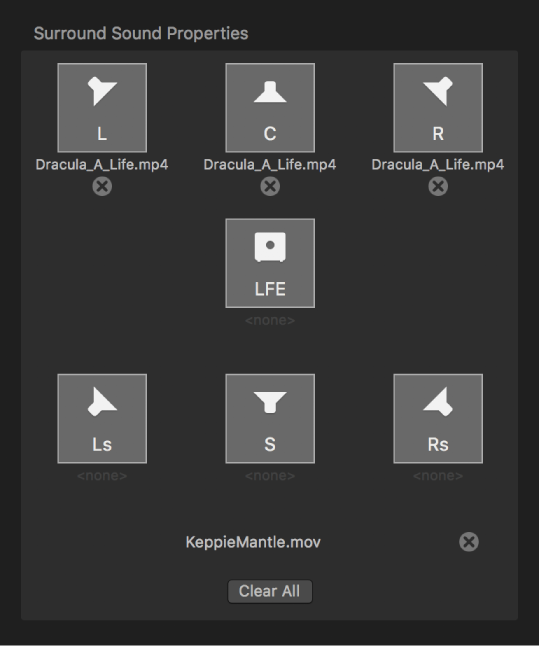
You can modify these file assignments using the following controls in the Surround Sound Properties area:
Remove button: Click a Remove button  to remove a file assigned to a channel.
Channel icon: Click the channel icon (a speaker icon or subwoofer icon) to assign a different file to a channel.
Add Video: Click the Add Video button to assign a video file to the surround sound source audio file. (If a video file has already been assigned, its filename replaces the Add Video button, as shown in the image above.)
Clear All: Click the Clear All button to clear all the audio files assigned to the audio channels and to remove the video file assigned to the surround sound source file.
The following properties are available in the Metadata section of the Job inspector:
Closed captions: Click the Choose button to add closed captions to your output file.
Add Job Annotation: Use this pop-up menu to add job annotation metadata to your output file.
For more information about metadata, see Add metadata.
For information about each job action and the properties it contains, see Job action properties.