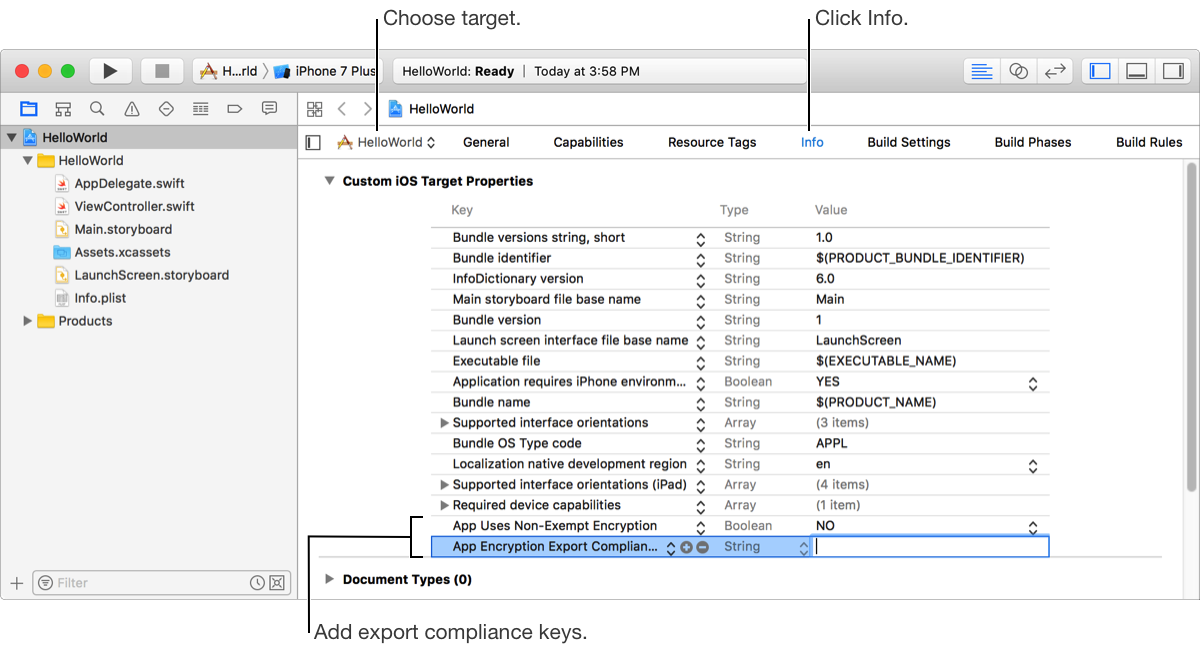
If your app uses encryption, you may be required to provide export compliance documentation in iTunes Connect. If your build doesn’t use encryption, you specify this information in Xcode.
You upload the export compliance document and submit it for review using iTunes Connect, as described in Provide export compliance documentation in iTunes Connect Developer Help. Once the document is approved, iTunes Connects will provide key-value pairs that you can add to the information property list (Info.plist) in your Xcode project. App Review
If you provide the export compliance information in the build, then you don’t need to provide this information later when you distribute your app using TestFlight or submit it to the App Store.
In the Project navigator ( ), choose the target, then click Info.
In the last row of the target properties table, click the Add button (+).
In the search field, enter the export compliance key followed by the Return character and set its value.
If your app is not using encryption, add the App Uses Non-Exempt Encryption key and set the value to NO.
If your app uses encryption, add the App Uses Non-Exempt Encryption key and set the value to YES.
If your app requires export compliance, add the App Encryption Export Compliance Code key and enter the value for this key provided by iTunes Connect.