 ) in the toolbar of the main window.
 Use the utilities area to inspect selected objects and use ready-made resources—such as media files—in your project. To open the utilities area, click the right button () in the toolbar of the main window.
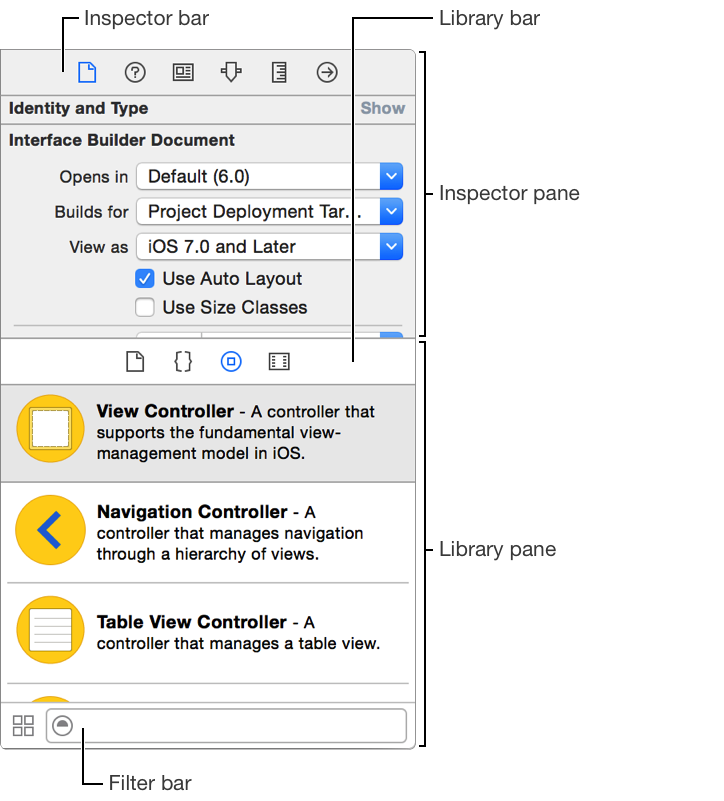
Use the inspector pane for viewing and editing information for the selected object or for the project. Clicking a button in the inspector bar shows the inspector. The available buttons in the bar depend on the current selection and can include:
Icon | Inspector | Description | |||||||||
|---|---|---|---|---|---|---|---|---|---|---|---|
| File inspector | View and manage metadata for a file, such as its name, type, path, and location within your project, and so forth. | |||||||||
| Quick Help | View details about a symbol, including a concise description, where and how it is declared, its scope, the parameters it takes, and its platform and architecture availability. | |||||||||
| Identity inspector | View and manage metadata for an object, such as its class name, accessibility information, runtime attributes, and labels. | |||||||||
| Attributes inspector | Configure attributes of the selected interface object. | |||||||||
| Size inspector | Edit the initial size and position, view constraints, minimum and maximum sizes, and autosizing rules for an interface object. | |||||||||
| Connections inspector | View the outlets and actions for an interface object, make new connections, and break existing connections. | |||||||||
| Bindings inspector | View and edit bindings for view objects. | |||||||||
| View Effects inspector | View and edit settings for animation, alpha channel, transitions, and other visual characteristics. | |||||||||
| SKNode inspector | View and edit attributes for a SpriteKit node such as a particle emitter, scene, or body in a scene. | |||||||||
| Source Control inspector | Shows the details of the selected repository or commit. | |||||||||
Use the library pane for accessing libraries of ready to use resources. Clicking a button in the library bar shows the library for those resources:
Icon | Library | Description | |||||||||
|---|---|---|---|---|---|---|---|---|---|---|---|
| File templates | Drag templates for common types of files and code constructs into the Project navigator. | |||||||||
| Code snippets | Drag short pieces of source code into your source code file. | |||||||||
| Objects | Drag objects such as view controllers, views, gesture recognizers, and formatters onto the Interface Builder canvas. | |||||||||
| Media files | Drag graphics, icons, and sound files to the Interface Builder canvas. | |||||||||
Quickly find what you need:
Show information about a resource: Click the resource and a popover appears.
Show only the library resources you need: In the filter bar at the bottom of the library pane, enter text in the search field.
Toggle between list view and icon view: In the filter bar, click the button to the left of the search field.


