
You can add useful information, such as to-dos, bug-fix reminders, and section headings to the jump bar symbol pop-up menu by annotating your code in the source editor.
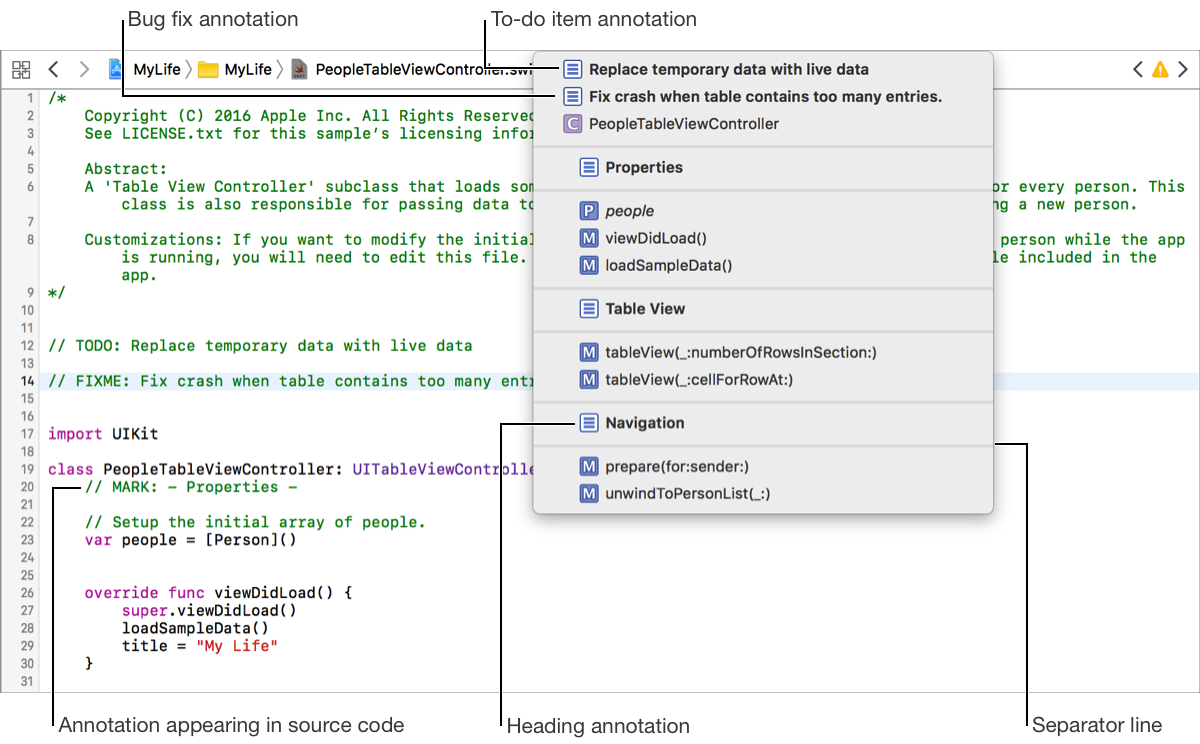
Add a to-do item: Insert a comment with the prefix TODO:. For example: // TODO: [your to-do item].
Add a bug fix reminder: Insert a comment with the prefix FIXME:. For example: // FIXME: [your bug fix reminder].
Add a heading: Insert a comment with the prefix MARK:. For example: // MARK: [your section heading].
Add a separator line: To add a separator above an annotation, add a hyphen (-) before the comment portion of the annotation. For example: // MARK: - [your content]. To add a separator below an annotation, add a hyphen (-) after the comment portion of the annotation. For example: // MARK: [your content] -.