
The main window is your primary interface for viewing, editing, and managing all the parts of your project. It is flexible and configurable, adapting to the needs of the task at hand and allowing you to configure it to fit your work style.
Creating or opening a project opens the main window. Open additional windows for your project by choosing File > New > New Window.
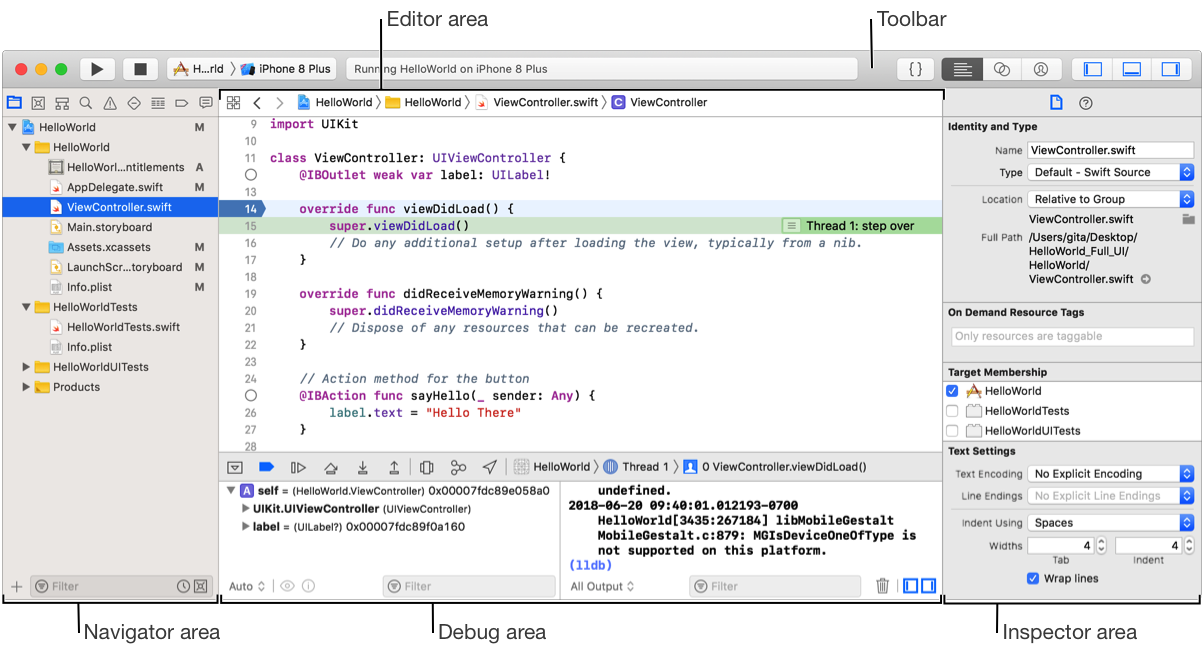
Use the toolbar for managing your project including:
Building and running your projects
Viewing progress of executing tasks
Configuring your work environment
Use the optional tab bar for organizing your open files. Choosing View > Show Tab Bar shows the tab bar. Tabs can be reordered, closed individually, or dragged out of the bar to create a new window.
The other areas in the main window include:
The editor area for viewing and editing the contents of your project including code, user interface files, property lists, project settings, and more.
The navigator area for viewing the parts of your project including files, symbols, breakpoints, and build information.
The debug area for controlling the execution of your app during debugging, and for displaying variables, register, and status information.
The inspector area for viewing and editing information about the selected object in the editor area or the entire project.