
Preview how a layout appears using different device configurations and localizations in the assistant editor. For iOS apps, preview the app using different devices and orientations. For iPad devices, preview the app using different split view sizes. For macOS apps, preview the app in light and dark mode.
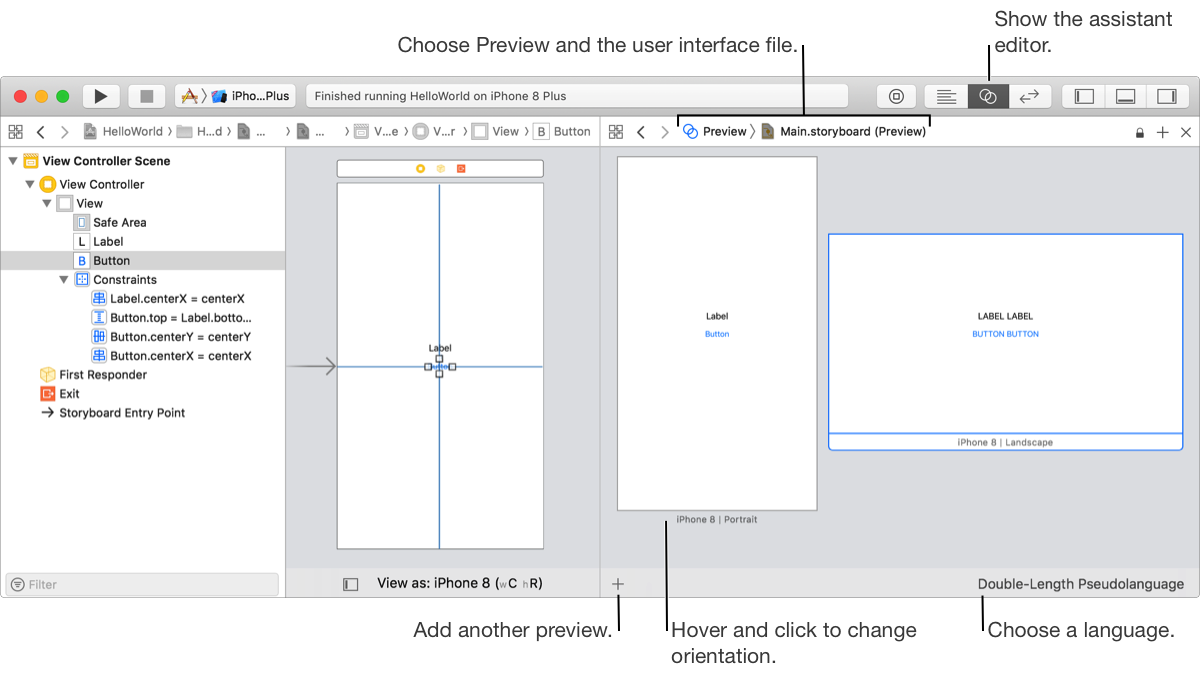
On the Interface Builder canvas or in the outline view, select the desired view controller.
Choose View > Assistant Editor > Show Assistant Editor to open the assistant editor.
In the assistant editor, open the editor pop-up menu by clicking on the first item in the jump bar.
In the pop-up menu, choose Preview > [Filename] where [Filename] is the user interface file (for example, Main.storyboard).
In the assistant editor, click the plus (+) button in the lower left corner.
From the pop-up menu, select a device or appearance.
For iOS and watchOS apps, choose a device.
For iPad devices, the choices include split screen sizes such as one-third of an iPad screen.
For macOS apps, choose Light Appearance or Dark Appearance.
For tvOS apps, choose Light Style or Dark Style.
In the assistant editor, move the mouse over the desired preview and click the rotation button ( ) that appears below the preview and beside the name of the device.
In the assistant editor, select a preview or click in the background to deselect all previews.
If no preview is selected, you will change the language of all previews.
Click the language button—for example, English—on the lower right.
In the pop-up menu that appears, choose a language.
If you haven’t localized your app yet (added languages), you can choose the development language or one of the pseudolanguage options:
Double-Length Pseudolanguage: Replaces all user-facing strings with duplicate strings.
Accented Pseudolanguage: Uses accented text in the pseudolanguage.
Bounded String Pseudolanguage: Uses bounded strings—strings with maximum length—in the pseudolanguage.