
Use the scheme editor to enable code coverage that provides statistics about your source code in test reports.
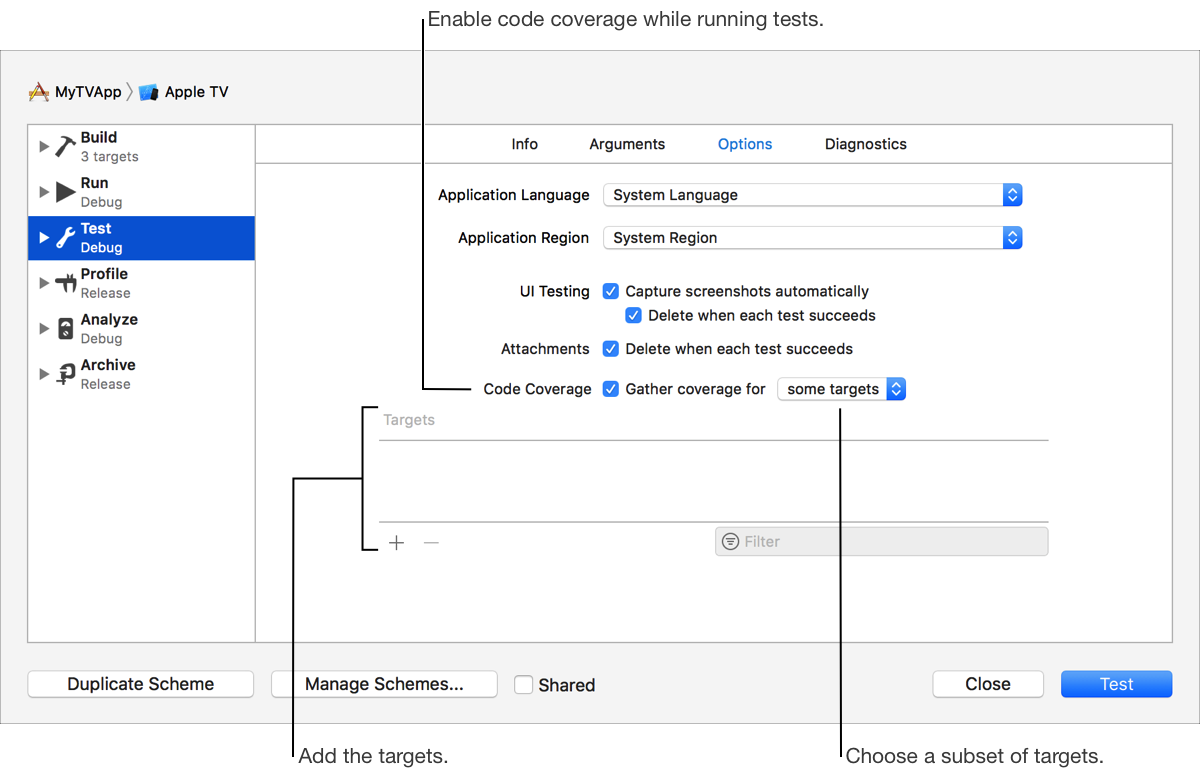
In the main window, choose Edit Scheme from the scheme menu in the toolbar.
In the left column, select the Test scheme action, then click Info on the right.
Select the “Code Coverage” checkbox.
Click Close.
Optionally, choose to include just some targets in the report.
From the “Gather coverage for” pop-up menu, choose “some targets.”
In the table that appears below, click the Add button (+).
In the sheet, select the targets (use Command-click to select multiple targets), then click Add.
Click Close.
You can use the xccov command-line tool to process the contents of Xcode coverage reports. To learn more, enter man xccov in Terminal.