 lets you view the webpages you have open on your other Mac computers (OS X v10.8.2 or later) and iOS devices (iOS 6 or later). Make sure Safari is turned on in iCloud preferences (on your Mac) and in Settings > iCloud (on your iOS devices).
The Show All Tabs button lets you view the webpages you have open on your other Mac computers (OS X v10.8.2 or later) and iOS devices (iOS 6 or later). Make sure Safari is turned on in iCloud preferences (on your Mac) and in Settings > iCloud (on your iOS devices).
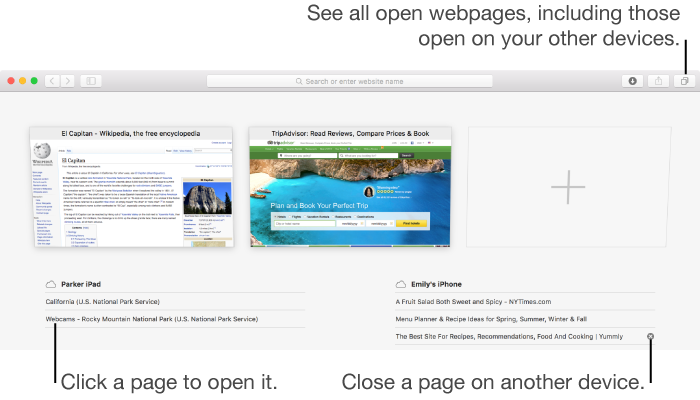
View a webpage open on another device: Click the Show All Tabs button to see the webpages open on your Mac along with lists of the webpages open on your other devices. Click a webpage to open it.
You can also enter part of the page’s name in the Smart Search field, then click the page in the iCloud Tabs section of your search results.
Close a webpage open on another device: Click the Show All Tabs button , move the pointer over a webpage listed below your device, then click the Close button  that appears to the right.