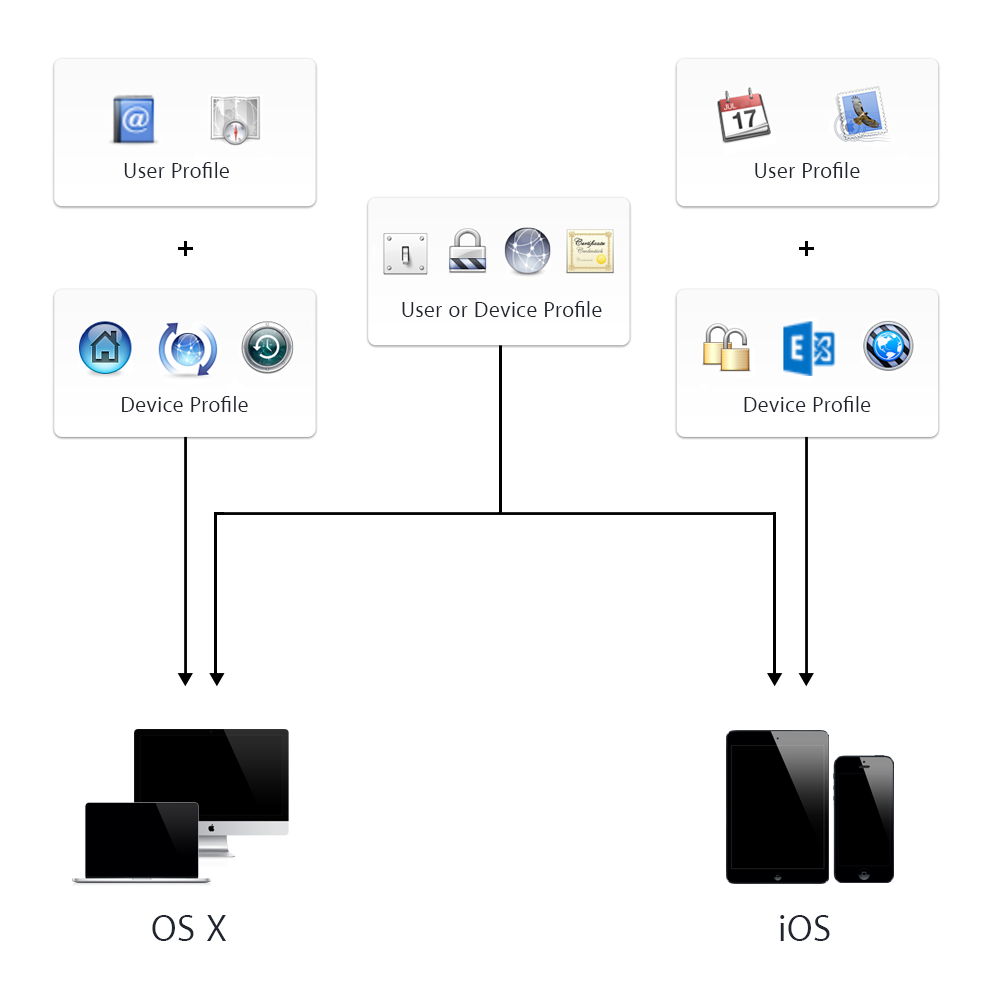
You can create payloads for iOS, OS X, or both. They can be applied to devices, users, and groups.
Remember, configuration profile and payload planning helps reduce complexity. Keep the following in mind:
A configuration profile can have more than one payload.
A device can have more than one configuration profile.
You can combine user profiles with device profiles.
If you have multiple profiles containing similar payloads with different settings, the resulting behavior is undefined.
Some payloads can actually have more than one unique payload. For example, a certificate payload often involves more than one certificate, and a VPN payload may involve more than one VPN setting. To create additional payloads from within a payload, click Add .
Here are some examples of optimized payload management:
If you want to manage iOS and OS X devices or users or both, and use the same payloads for all the devices, focus on iOS and OS X payloads, then decide if your management should be at the device or user level. (These payloads are in the table in the “OS X and iOS” column.)
If you want to manage only iOS devices or users of iOS devices, focus on iOS-only payloads, then decide if your management should be at the device or user level.
If you want to manage only OS X devices or users of OS X devices, focus on OS X-only payloads, then decide if your management should be at the device or user level.
To learn more about payloads, see the Configuration Profile section of this help.
Payload categories
The following table shows the payloads that are available when you select Device (and device groups) or User (and user groups) in the Profile Manager sidebar. Payloads that can have more than one unique payload are indicated by an asterisk.

 .
.