You can adjust the margins for specific paragraphs to indent them from the document margins, and change the indentation of the first line of each paragraph.
Select one or more paragraphs, or press Command-A to select all paragraphs in the document.
Do any of the following:
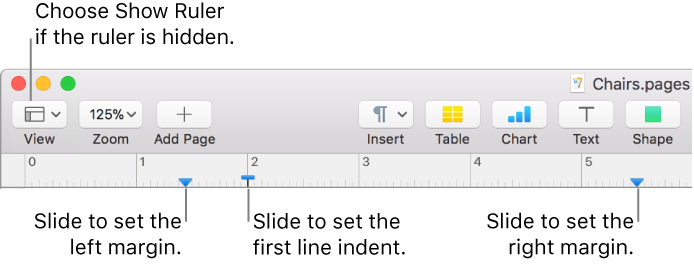
In the ruler, drag the margin marker (the blue triangle) to where you want it.
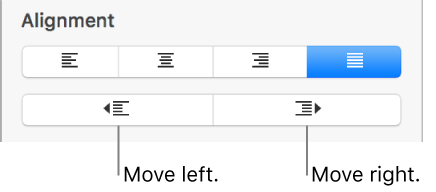
In the Format  sidebar, click the Style button near the top, then click one of the default indent buttons in the Alignment section to increase or decrease the indent of an entire paragraph.
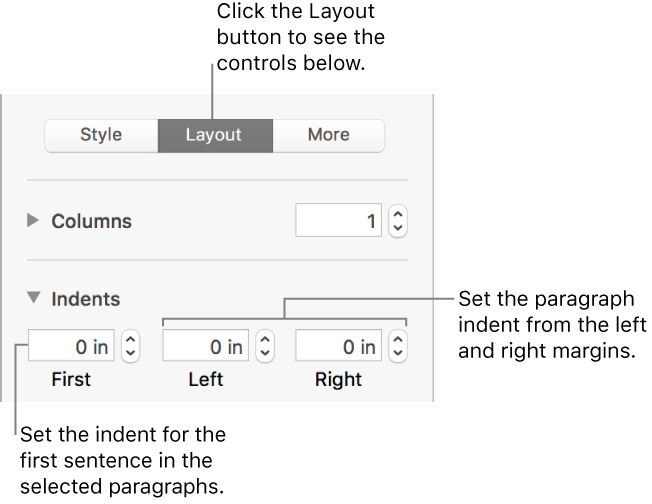
If the text is in a text box, table, or shape, first click the Text tab at the top of the sidebar, then click the Layout button.
Note: For margins of less than 1 inch, adjust the document margins in the Document sidebar (see Set document margins for a word-processing document).
You can set the ruler to use points, inches, or centimeters; to show the tick marks as percentages; and to place zero at the center of the ruler. See Change ruler units to learn how.
You can indent the first line of text in a paragraph to create a visual break in the document that helps readers scan paragraphs.
Select one or more paragraphs, or press Command-A to select all paragraphs in the document.
Do any of the following:
In the ruler, drag the first line indent marker (the blue rectangle) to where you want it.
The first line indent rectangle may be directly above the left margin triangle. If you can’t select just one of the markers, use the controls in the sidebar to set the margin and indent (see the option below).
In the Format sidebar, click the Layout button near the top, click the disclosure triangle next to Indents, then click the arrows next to First.
If the selected paragraphs are in a text box, table, or shape, first click the Text tab at the top of the sidebar, then click the Layout button.