You can add or remove hyphens from all text in your document, or just for individual paragraphs.
You can also use Smart Quotes to automatically convert quotation marks to curly quotation marks and use Smart Dashes to convert double hyphens (--) to dashes (—).
Click
in the toolbar, then select or deselect the Hyphenation checkbox.
The setting applies to all text in the document, including text in shapes, except where you add or remove hyphens for specific paragraphs (see the next task).
Click in the paragraph or select multiple paragraphs.
Click the More button near the top of the sidebar on the right.
If you don’t see a sidebar, or the sidebar doesn’t have a More button, click
in the toolbar. If the text is in a text box, table, or shape, first click the Text tab at the top of the sidebar, then click the More button.
In the Hyphenation & Ligatures section of the sidebar, select or deselect the “Remove paragraph hyphenation” checkbox.
Any paragraphs you modified aren’t changed if you later change the hyphenation setting for the whole document (see the previous task).
You can specify a quotation mark style for single and double quotation marks in your document.
To apply formatting just to specific text, rather than the whole document, select the text.
Choose Edit > Substitutions > Show Substitutions (from the Edit menu at the top of your screen).
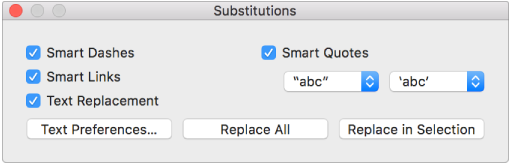
In the Substitutions window, select the Smart Quotes checkbox.

Click the left Smart Quotes pop-up menu, then choose a style for double quotation marks.
Click the right Smart Quotes pop-up menu, then choose a style for single quotation marks.
Do one of the following:
Replace all quotation marks in the document: Click Replace All.
Replace quotation marks in only selected text: Click Replace in Selection.
To apply formatting just to specific text, rather than the whole document, select the text.
Choose Edit > Substitutions > Show Substitutions (from the Edit menu at the top of your screen).
In the Substitutions window, select the Smart Dashes checkbox.

Do one of the following:
Replace all dashes in the document: Click Replace All.
Replace dashes in only selected text: Click Replace in Selection.
To turn off automatic formatting for quotation marks and dashes, deselect a checkbox.